
Self-Host n8n on Hetzner: The Ultimate Guide to Free Automation

Automation made easy: Self-hosting n8n
Every day, companies juggle dozens of different tools. From CRM to Slack to Google Sheets. The problem: These applications rarely talk to each other. The result? Manual work, lost time, and unnecessary errors.
The solution is workflow automation. This article shows how to automate processes with n8n in just a few steps. And best of all, the self-hosted version of n8n can be operated for free, with only server costs incurred.
What is n8n and why should you self-host it?
n8n is a node-based workflow automation platform that allows you to connect various services and APIs. Unlike cloud-based alternatives like Zapier, self-hosting n8n offers complete control over data and workflows.
How n8n works simply:
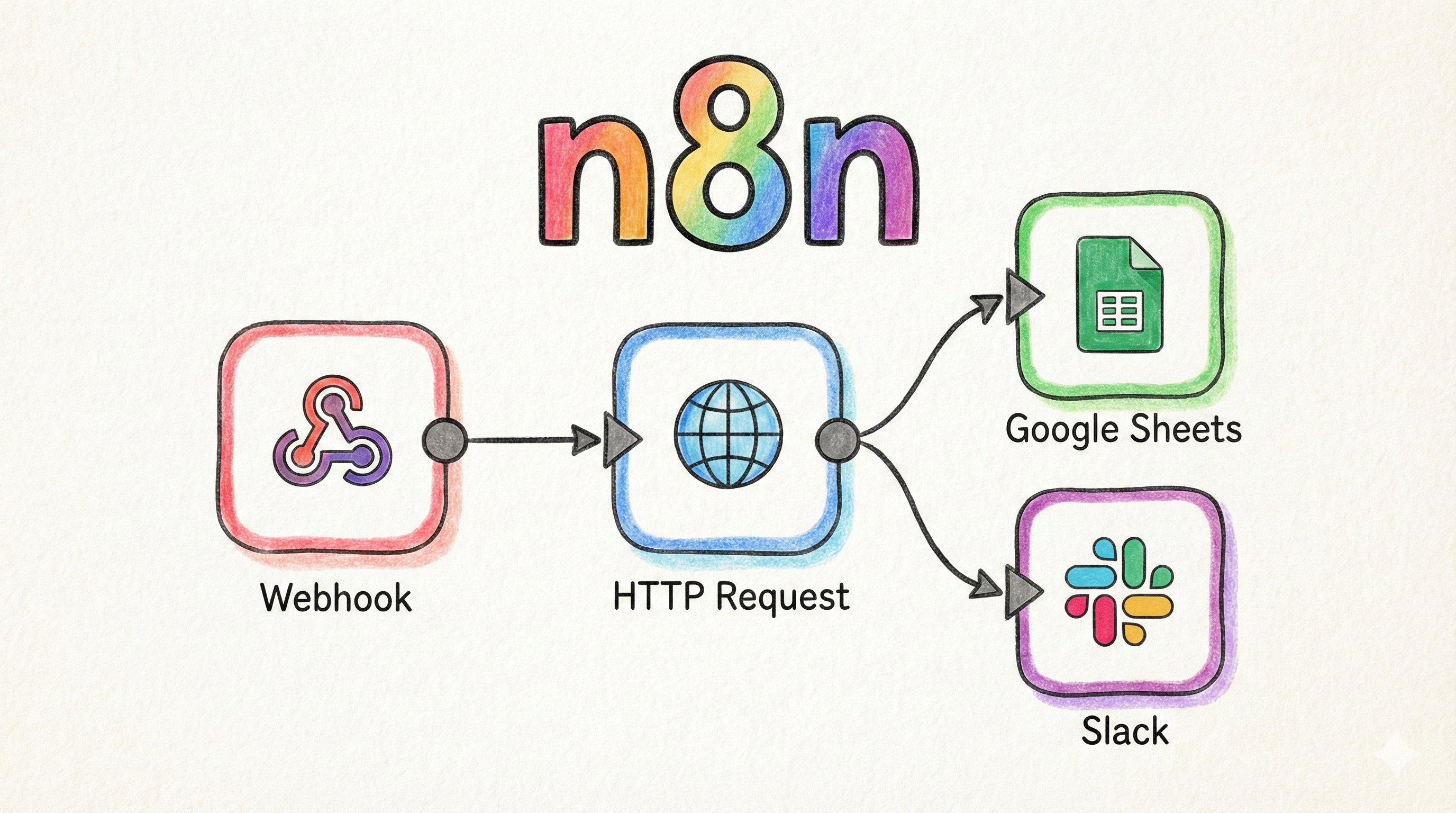
Nodes are the building blocks. Every service, be it Slack, Gmail, a CRM system, or a simple HTTP request, is represented as a node.
Workflows are created by visually connecting these nodes via drag-and-drop. No code is required, but JavaScript or Python can be used if needed.
Triggers start workflows automatically. This can be a new email, a webhook call, or a time-based trigger like "Every Monday at 9 AM".
The big advantage of self-hosting n8n: Sensitive business data never leaves your own infrastructure. The solution is GDPR-compliant and can be adapted to specific requirements.
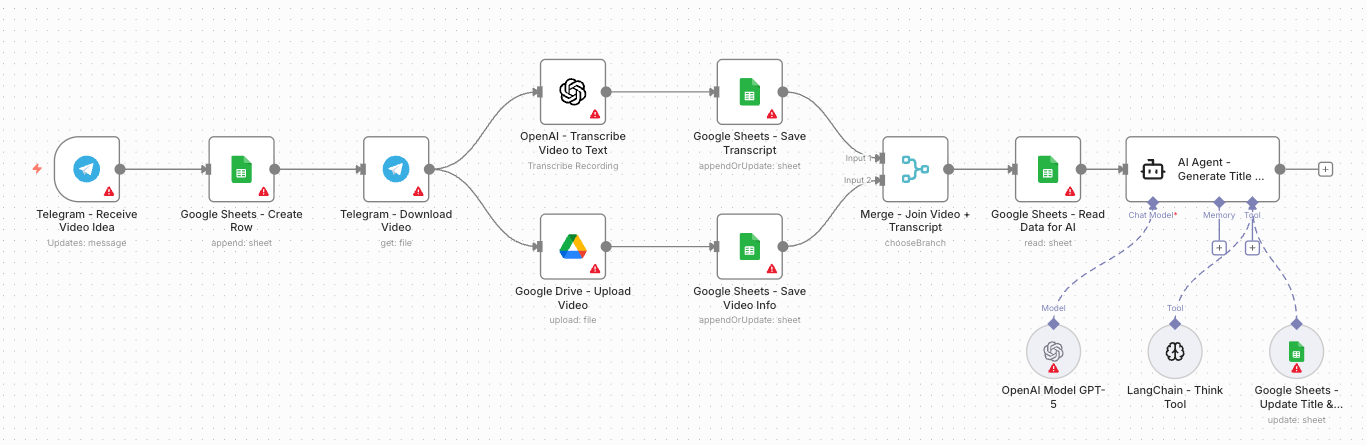
Here is a simple example of a workflow:
Practical Use Cases for n8n
Here are some concrete examples of how n8n can simplify your daily work:
Automate Lead Management: A new contact fills out a web form. n8n receives the data via webhook, checks the email address for validity, and automatically creates a new entry in the CRM – including a notification to the sales team via Slack.
Improve Internal Communication: As soon as a new entry appears in the Airtable project database, n8n automatically sends a formatted message to the relevant Slack channel with all relevant details.
Accelerate Content Workflows: After publishing a new blog article in WordPress, n8n automatically posts an engaging link to LinkedIn and Twitter accounts – with individually adapted text for each platform.
Synchronize Data: Keep customer master data synchronized between the shop system and accounting software, even if both systems do not offer native integration.
Self-hosting n8n with Docker: The Technical Foundation
If n8n is to be installed on your own server, Docker is the recommended method. Docker ensures that n8n runs in an isolated environment and brings all dependencies with it. A small tutorial on Docker fundamentals is available here.
Basic Requirements:
- A server or VPS (recommended: at least 2 GB RAM)
- Installed Docker Engine
- A domain for access via HTTPS
A Minimal Docker Setup
With Docker Compose, n8n can be started with just a few lines of configuration. A simple docker-compose.yml looks like this:
version: '3.8'
services:
  n8n:
    image: n8nio/n8n
    container_name: n8n
    restart: always
    ports:
      - "5678:5678"
    environment:
      - N8N_HOST=your-domain.de
      - N8N_PORT=5678
      - N8N_PROTOCOL=https
      - WEBHOOK_URL=https://your-domain.de/
    volumes:
      - n8n_data:/home/node/.n8n

volumes:
  n8n_data:
With the command docker-compose up -d, the n8n instance is started. The data is stored persistently in a Docker Volume and is not lost even after restarts.
Important: For production use, a reverse proxy like Caddy or Nginx is additionally required to handle SSL certificates.
Setting up n8n on Hetzner VPS: German Server meets Workflow Automation
For self-hosting n8n, a reliable server provider is important. Hetzner offers an excellent combination of performance, price, and data protection.
Why Hetzner is ideal for n8n:
Data Centers in Germany: Data remains in Germany and is thus subject to strict GDPR guidelines. This is ideal for companies with high compliance requirements.
Docker-Ready Images: Hetzner offers pre-configured cloud servers with Docker already installed. This saves manual installation and allows you to start deployment directly.
Fair Pricing: Cloud servers (Cloud VPS) start at just a few Euros per month. You only pay for the time actually used. This is perfect for testing and for small to medium-sized projects.
Scalable: If automation requirements grow, the Hetzner server can be easily scaled up without having to start completely from scratch.
A typical configuration for n8n on Hetzner:
- Server Type: CX23 (2 vCPU, 4 GB RAM, 40 GB SSD)
- Location: Nuremberg or Falkenstein (Germany)
- Image: Docker CE App
- Cost: From approx. €3.49 per month
Practical Example: n8n with Caddy as Reverse Proxy
Manually setting up n8n requires a few technical steps. Here is a complete example that anyone can replicate. With automatic SSL certificates through Caddy.
Step 1: Prepare Server
After logging into the Hetzner server, first create the necessary directories:
mkdir -p ~/n8n-setup
cd ~/n8n-setup
Step 2: Create Docker Compose File
A complete docker-compose.yml with n8n and Caddy as Reverse Proxy:
version: '3.8'

services:
  caddy:
    image: caddy:2-alpine
    container_name: caddy
    restart: always
    ports:
      - "80:80"
      - "443:443"
    volumes:
      - ./Caddyfile:/etc/caddy/Caddyfile
      - caddy_data:/data
      - caddy_config:/config
    networks:
      - n8n-network

  n8n:
    image: n8nio/n8n
    container_name: n8n
    restart: always
    environment:
      - N8N_HOST=automation.your-domain.de
      - N8N_PORT=5678
      - N8N_PROTOCOL=https
      - NODE_ENV=production
      - WEBHOOK_URL=https://automation.your-domain.de/
      - GENERIC_TIMEZONE=Europe/Berlin
    volumes:
      - n8n_data:/home/node/.n8n
    networks:
      - n8n-network

volumes:
  n8n_data:
  caddy_data:
  caddy_config:

networks:
  n8n-network:
    driver: bridge
Step 3: Create Caddyfile
In the same directory, create a file named Caddyfile:
automation.your-domain.de {
    reverse_proxy n8n:5678
}
Caddy automatically takes care of SSL certificates from Let's Encrypt. No manual configuration is necessary.
Step 4: Start and Test
Start the entire setup with a simple command:
docker-compose up -d
After about 30 seconds, n8n is accessible at https://automation.your-domain.de. An admin account is created upon the first visit.
Important Notes for Production Operation
DNS Configuration: The domain must point to the server's IP address. An A-record with the server IP value is sufficient.
Firewall: Ports 80 and 443 must be open. In Hetzner Cloud, this can be done via the firewall settings.
Backups: Regular backups of the n8n_data volume secure all workflows:
docker run --rm -v n8n-setup_n8n_data:/data -v $(pwd):/backup alpine tar czf /backup/n8n-backup-$(date +%Y%m%d).tar.gz /data
Updates: n8n can be updated with just a few commands:
docker-compose pull
docker-compose up -d
Conclusion: Workflow Automation without Compromises
Installing n8n on your own server offers maximum flexibility and data control. With over 400 integrations, practically any service can be integrated into automations. The difference to cloud solutions: You don't pay per workflow execution, but only for the server resources.
Combined with the reliability of Hetzner servers and the simplicity of the LowCloud template, nothing stands in the way of your automation strategy.
Ready for your first automation? Start now with the n8n template in LowCloud and experience how easy professional workflow automation can be.
Further information on n8n can be found in the official documentation. If you have questions about deployment or DevOps-as-a-Service solutions, the lowcloud team is happy to help.