
Deploy Your App: From Idea to a Live URL

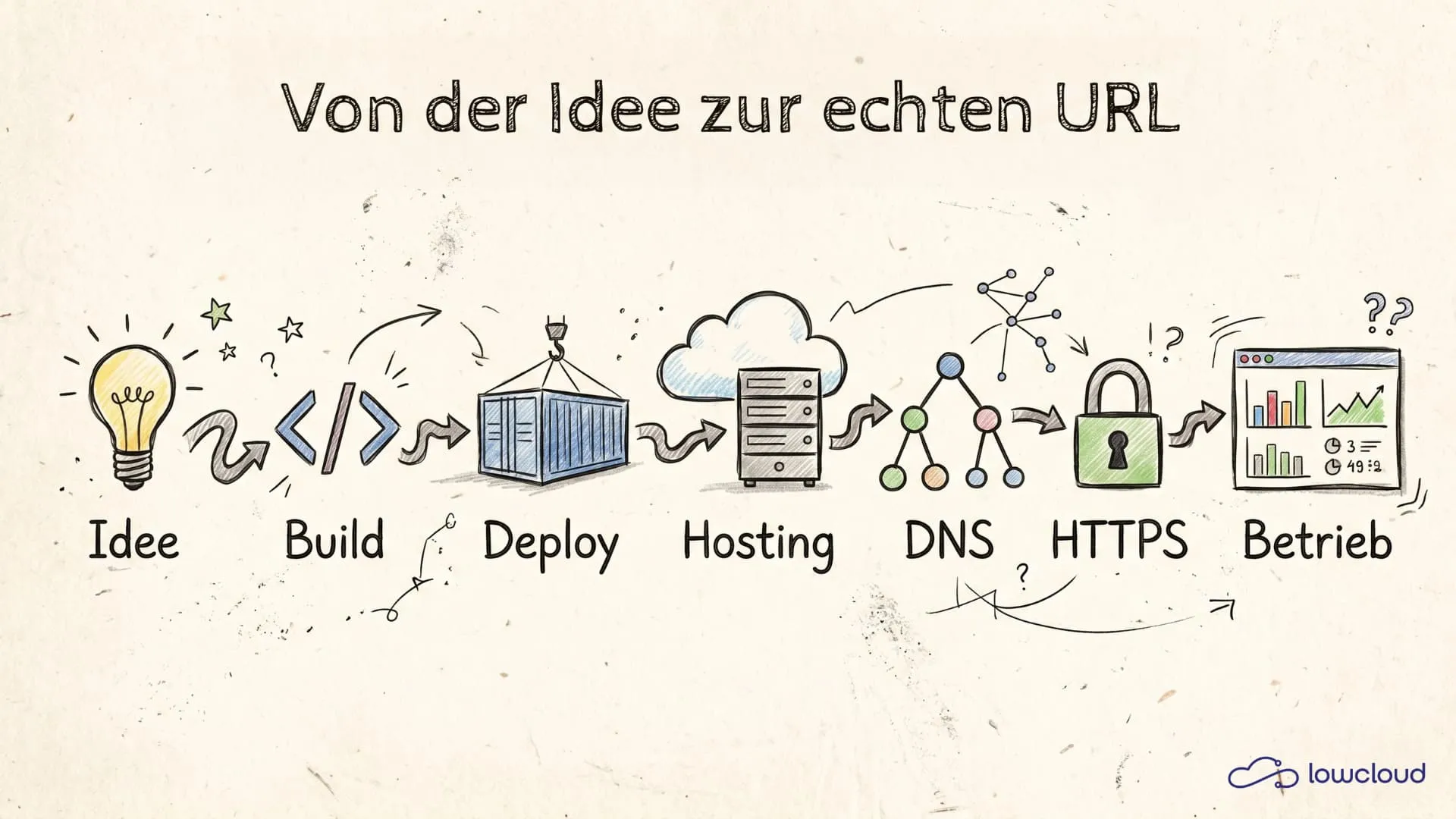
When you have an idea today, you can build something clickable in a few hours: a landing page prototype, a small tool, an internal dashboard. AI tools, no-code/low-code, and framework templates make getting started easier than ever. Yet the point where many people get stuck isn't the building, it's the publishing. "I want a real URL I can share" sounds trivial, but it's a complete process made up of deployment, domain, DNS, HTTPS, and operations.
This guide traces the whole path from start to finish. Not as a marketing story, but as a practical map: which decisions you need to make, which steps are always the same, and where the typical pitfalls are.
What "from idea to URL" really means
A "URL" is, in the end, just a name (your domain) that points to a running service. The service can be a static website, a full-stack server, an API, or a container. Between idea and URL, these are the core building blocks:
- Build: Source code/assets are turned into an artifact (e.g. a folder of HTML/CSS/JS, a Node bundle, or a container image).
- Deploy: This artifact is placed onto an environment so that it runs and is reachable.
- Runtime/hosting: The infrastructure that runs your service (server, serverless, container platform).
- Domain & DNS: Your domain is configured to point at the service.
- HTTPS/TLS: Traffic is encrypted, certificates are issued and renewed.
- Operations: Logs, monitoring, updates, rollbacks, backups (if data is involved).
Important: the order isn't always strictly linear, but in the end you have to tick off every point. The biggest frustration comes when you "deploy" but DNS or HTTPS isn't set up cleanly — then it feels like "it doesn't work," when really only one building block is missing.
From concept to build: What to clarify before deployment
Before you click "Deploy" anywhere, you need a clear picture of what you're actually publishing. That saves you time later, because your hosting and domain setup depend heavily on it.
Static vs. full-stack vs. API + frontend
- Static: Pure HTML/CSS/JS files, possibly a build from a static site generator. This can be hosted almost anywhere and is usually the simplest.
- Frontend + API: The frontend can be static, but it talks to an API (e.g. REST/GraphQL). Then you need two deployments (or a platform that runs both together).
- Full-stack: A server renders pages, manages sessions, talks to databases. Here you need a runtime that runs continuously.
- Background jobs/workers: If you have queue workers, cron jobs, or webhooks, they belong in the deploy plan.
If you're not sure which category you fall into, here's a simple test: "If I close the browser tab, does something keep running?" Or: "Do I need a server process that accepts requests?" As soon as the answer is "yes," you're beyond pure static hosting.
What is your runtime, or is it a container?
The next questions are technical, but important:
- Does your app run as Node.js, Python, Ruby, Go?
- Do you need system dependencies (e.g. ImageMagick, ffmpeg)?
- Are there native builds?
- Do you have a database?
If you built with AI tools, you often end up with "something with Node" or a Dockerfile. A container is frequently the lowest common denominator here: you pack everything you need into an image and deploy that image. (If you're unsure why, here's why teams deploy with containers.)
For non-developers that's good news: you don't have to understand every hosting platform and its buildpacks. You just need a repeatable way to build an image and run it.
Deployment: The moment a build becomes a running service
Deployment means: your artifact is placed into an environment, configured, and started. Most problems happen here for two reasons: missing configuration (environment variables, secrets) or wrong assumptions about networking/ports — the same typical vibe-coding deployment problems that break apps in production.
Hosting options at a glance
Broadly, you can choose between these approaches:
- Shared hosting
More for classic websites, rarely good for modern apps. Usually not recommended for full-stack. - VPS / your own server
Maximum freedom, but suddenly you're also ops: updates, firewall, reverse proxy, certificates, monitoring. - Managed app hosting / PaaS
You deploy an app or container, and the platform handles runtime, routing, HTTPS, scaling. - Kubernetes
Very powerful, but overkill if you "just" want to get an app live and have no platform experience.
If your goal is "live fast, reproducible, with little operational overhead," in practice you usually end up at a Platform-as-a-Service (PaaS) or a container platform that offers PaaS features.
Staging and production: Why two environments are worth their weight in gold
A classic: you make "a small update," deploy it, and suddenly the site is down. If you only have one environment, that's instantly visible to everyone.
A minimalist setup:
- Staging: an internal test URL (can be a subdomain, e.g.
staging.your-domain.com) - Production: the real domain
This gives you:
- safe tests for DNS/HTTPS changes,
- a place for migrations,
- a rollback option without risking live traffic.
Domain & DNS: How the name finds the IP
This is where you jump from "running somewhere" to "running under my domain." DNS is no black magic, but it's unfamiliar because mistakes aren't immediately visible (caching/TTL).
A/AAAA/CNAME/TXT in 10 minutes
The most important record types:
- A record: domain/subdomain → IPv4 address
Example:app.your-domain.com→203.0.113.10 - AAAA record: domain/subdomain → IPv6 address
- CNAME: domain/subdomain → another hostname
Example:www.your-domain.com→your-service.platform.example - TXT: free text, often for verification and security
Example: domain verification, SPF/DKIM, ACME challenges (depending on setup)
Most PaaS platforms give you either:
- a fixed IP (A/AAAA), or
- a target hostname (CNAME), or
- both (depending on the product).
Important: on the root domain (your-domain.com), a CNAME is often not possible, depending on your DNS provider. Then you use A/AAAA or so-called ALIAS/ANAME records (provider-dependent). To get started, it's often easiest to connect www or app as a subdomain via CNAME and redirect the root domain to www.
Typical DNS traps (TTL, proxy, wrong record)
DNS problems like to feel "random," but they're usually:
- Wrong record: You set
A, but the platform expectsCNAME(or vice versa). - Wrong subdomain: You change
your-domain.com, but what's reachable iswww.your-domain.com. - TTL/caching: Changes take time. Depending on the TTL, anything from 5 minutes to several hours is normal.
- Duplicate entries: Two records for the same host (e.g. two A records), and depending on the resolver you get alternating answers.
- Proxy/CDN toggle: Some DNS providers have a proxy mode. That can affect HTTPS/ports if you don't realize there's another layer in between.
A practical debugging approach:
- First check which record is actually being served (e.g. with
digor online DNS tools). - Then check whether the platform shows the domain as "connected" (many platforms have a domain-check UI).
- Only after that do you move on to HTTPS.
HTTPS: Why certificates are mandatory today (and how they become automatic)
A URL without HTTPS is effectively "broken" today:
- browsers warn,
- APIs and OAuth callbacks expect HTTPS,
- cookies need "Secure" in many cases.
The good way is: automatic certificates (Let's Encrypt) with automatic renewal. Modern platforms usually do this on their own after the domain connect.
If you run it yourself (VPS), you typically need:
- a reverse proxy (nginx, Caddy, Traefik),
- an ACME client for certificates (Caddy does this automatically, for example),
- a clean redirect from HTTP → HTTPS.
Typical mistakes:
- DNS isn't pointing correctly yet → the certificate can't be issued.
- Port 80/443 not reachable (firewall/security group).
- You terminate TLS in the wrong place (e.g. proxy + app both "think" they're speaking HTTPS).
If at this point you notice you're starting to learn reverse proxies and certificate handling, that's a good signal to go with a platform that does this as standard — simply because otherwise it eats time without making your product any better.
Operations: Logs, monitoring, updates, rollback
"It's live" is not the end. From now on, what counts is that it stays live.
Observability light: The minimum you need
A minimal operations stack:
- Logs: Can I see errors from the last 5–15 minutes? (HTTP 500, stack traces, timeouts)
- Health check: Is there a URL that says "OK"?
- Uptime monitoring: If the site is down, I get a notification.
- Metrics light: CPU/RAM and possibly response times.
You don't need a full observability setup right away. But without logs you're blind, and without alerts you notice outages too late.
Updates and rollback: How to keep it stress-free
An update is usually a new build/container image plus possibly a database migration.
Best practices that work even without deep tech:
- Version your deployments (e.g. via tags).
- Blue/green or rolling deploy (platform feature): the new version starts before the old one is gone.
- Rollback button: if it blows up, go back to the last version.
If you do this manually on a server, you have to build this mechanism yourself. It's doable, but it's exactly the kind of work you rarely want to do "real quick" on the side.
When data is involved: Backups & migrations
As soon as you have a database, a few rules apply:
- Backups are mandatory (automated, tested).
- Migrations have to be plannable.
- Access credentials (DB passwords) belong in secrets, not in code or in a Google Doc.
Especially with stateful apps, the difference between "hosting somewhere" and "operating cleanly" becomes clear. A platform that offers databases/backups as an integrated feature saves you real effort here.
Checklist: A stable URL in 30 minutes
This checklist is deliberately pragmatic. It works for most web apps and services.
- Clarity: Is it static or full-stack? Is there a database?
- Artifact: Do you have a build or a container image that starts locally?
- Deploy target: Platform chosen (PaaS/container platform).
- Configuration:
- Environment variables/secrets set
- Port/start command correct
- Deploy to staging: First onto a platform URL, without your own domain.
- Smoke test: Does the most important flow work end to end once?
- Connect domain:
- Subdomain (e.g.
wwworapp) via CNAME/A to the platform - Mind the TTL
- Subdomain (e.g.
- Enable HTTPS: Certificate is issued automatically (or proxy configured correctly).
- Redirects:
http → https, optionallyroot → www. - Monitoring:
- Logs reachable
- Uptime check enabled
- First update: Deploy a small, harmless update to test the process.
- Rollback plan: Where do you click when something goes wrong?
Once you've gone through this list, the next app is no longer a "journey into the unknown," but a repeatable process.
lowcloud in context: One-click container deployment all the way to the domain
If you've read this far, it's probably clear where most of the complexity sits: not in "I have an idea," but in operating a reliable URL with HTTPS, updates, logs, and, if needed, databases.
lowcloud picks up exactly here: as a sovereign platform that breaks container deployment and full-stack operations down so you don't have to build your own ops layer first. In practice, that means:
- You deploy your application as a container (or in a workflow that turns it into a container).
- You get routing and HTTPS as standard, instead of a project for "someday."
- You can run full-stack apps, including stateful components (e.g. databases), without wiring yourself through a dozen individual services.
- You keep monitoring/transparency in view, so operations don't become a black box.
- And because lowcloud is hosted in Germany, it's relevant for teams that want to map sovereignty, data location, and compliance cleanly.
The decisive point: a platform isn't "convenience," it's a way to make the last mile — domain, DNS, HTTPS, operations — reliable and repeatable, without having to become an infrastructure team to do it.
Sovereign Cloud Checklist for SMEs: What Counts
Use this 12-point checklist to assess your cloud for GDPR, NIS2 and real data control, so you can make informed decisions without costly mistakes.
Ship Fast: Sovereign Cloud Providers Germany Compared
Compare sovereign cloud providers in Germany with a builder-first framework: ship fast, keep data in the EU, and avoid lock-in, without a platform team.