

Server, Docker, SSL: app hosting terms explained

Your app runs locally. Cursor, Lovable or Bolt delivered, the prototype does what it should, and now you want to get the thing live. Instead of a live URL, you get a wall of words: server, Docker, SSL, environment variables, reverse proxy. It sounds like you need to go back and finish a DevOps degree before anyone can open your app in a browser. If you are wrestling with the jump from preview to production, that is the same wall in a different shape.
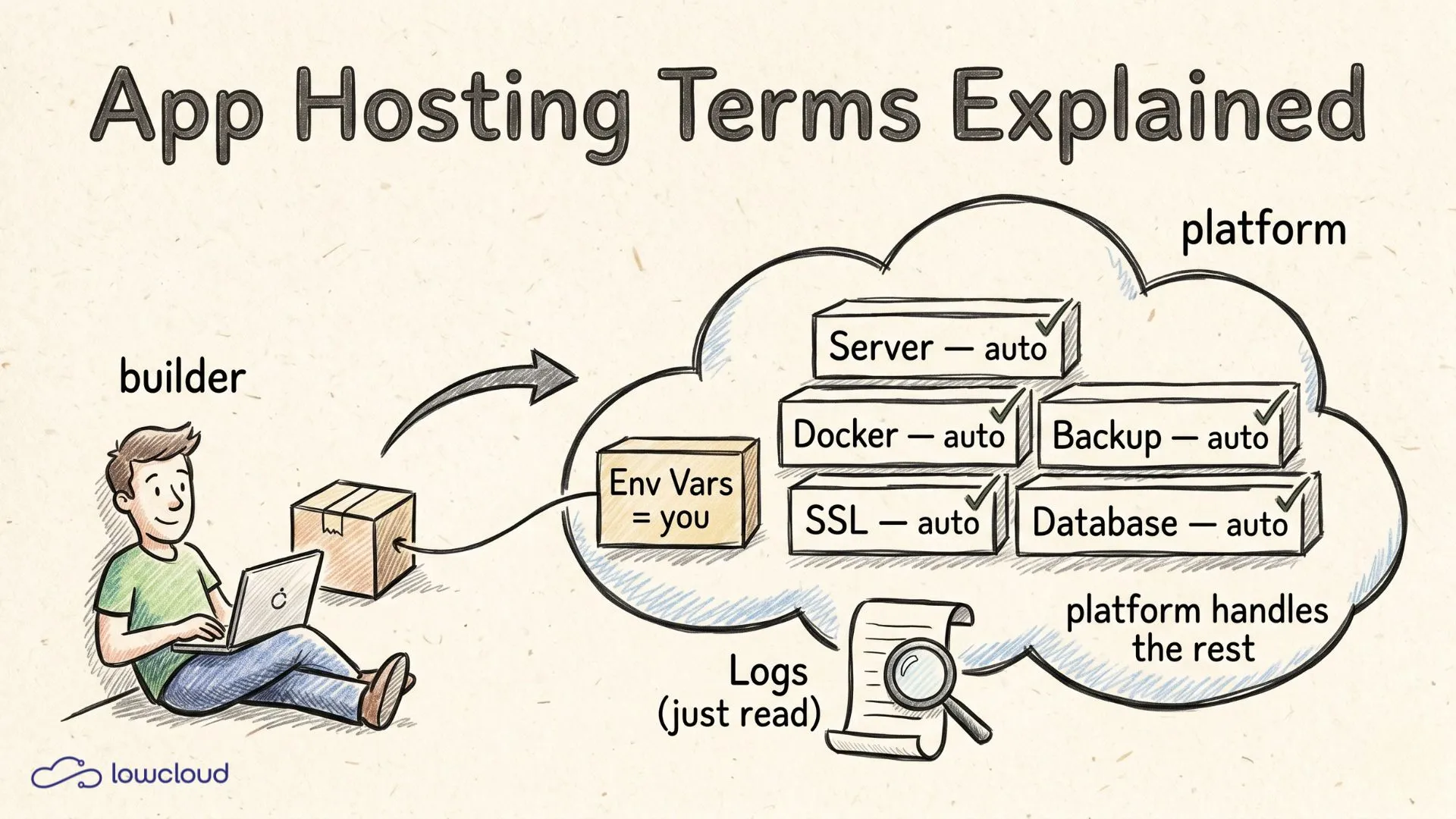
You don't. We'll walk through the nine terms that keep showing up when you host an app, in plain language, with one honest answer per term: do you need to know this yourself, or does the platform handle it for you? By the end you'll know what the words mean and which ones you can safely ignore when you deploy. Spoiler: there's exactly one you really touch yourself.
Key takeaways
- A server is just a computer that's always on, and hosting means renting that computer instead of parking it under your desk.
- Out of nine typical hosting terms, you need to actively master exactly one as a builder: environment variables. A modern platform handles the rest.
- Docker, SSL and backups run automatically in the background on a PaaS. You don't type a single command into a terminal for any of them.
- SSL is the standard today, not a luxury: 88% of all websites ran over HTTPS in June 2025 (W3Techs, 2025), and good platforms issue the certificate for free and automatically.
What are servers, hosting and deployment, really?
A server is a computer that never switches off. Your app needs a machine like that because your laptop closes at night, and then nobody can reach the site. Hosting simply means renting that always-on computer instead of buying hardware yourself. Deployment is the act of moving your app from your laptop onto that server. If you want the full path from idea to a live URL, we walk through deployment, domain, DNS and HTTPS step by step.
These three words fit together like a move, an apartment and a key handover. The server is the apartment, the hosting is the rent, the deployment is moving day. With classic setups, deployment means a lot of manual work: upload files, install dependencies, restart services. On a modern platform it's a git push or a click, and a few seconds later the new version is live.
What matters for you: you never set up the server or hosting yourself, that's exactly what you pay a platform for. Deployment is the only one of the three steps you actively trigger, and even that comes down to the push of a button with good providers.
Docker and SSL: do you need to understand them to deploy?
No, you don't have to master either one. Docker is a standardized package for your app. It puts your code plus everything it needs to run into a box that starts the same way on every server. That's the end of the infamous "but it worked on my machine". SSL is the encryption behind the https and the little padlock in the address bar, the thing that stops anyone from reading along between user and app.
Docker has gone mainstream: in the Stack Overflow Developer Survey 2025, 71.1% of all surveyed developers used it, the biggest adoption jump in the entire report (Stack Overflow, 2025). Still, you don't have to write a Dockerfile by hand. Platforms detect your app and build the image automatically.
SSL works the same way. You used to buy certificates at a high price and install them manually. Since Let's Encrypt launched in 2015 they've been free, and in 2025 the service issued around ten million certificates per day (Let's Encrypt, 2025). A good platform fetches and renews your certificate in the background. You only need to enter your domain, the rest happens on its own.
Database, backup and environment variables: where your data lives
These three terms are all about your data. A database is the place where your app stores what it needs to remember: user accounts, orders, text. A backup is an automatic copy of that data, so nothing is lost when something goes wrong. Environment variables are secret configuration values like API keys or passwords that don't belong in your code.
Database and backup run as a booked service on a PaaS. You pick a Postgres or MySQL database, and the platform takes care of operation and regular backups. You don't administer anything here yourself.
Environment variables are the one item on this list you really touch yourself. When your app needs a Stripe key or an OpenAI token, you don't write the value into the code, you store it as a variable. The most important rule: never commit a .env file to your Git repo, that's what .gitignore and a .env.example without real values are for (GitGuardian, 2025). On a good platform you just enter these values into a form in the dashboard.
What are logs for when something doesn't work?
Logs are the record of your app, line by line, of what just happened. When your app won't start in production or a page throws an error, the answers are in the logs. They're your most important debugging tool, and you can learn to read them in five minutes. You look for the first red line, and the problem is usually right there.
From the deploys that vibe coders do with us, the most common "my app won't start" moment is almost always a missing environment variable. The app looks for an API key, can't find it and bails out. The logs then show a line like "missing environment variable", and suddenly it's clear what went wrong. We see this pattern almost daily in support, and the fix usually takes under a minute. It is one of the typical vibe-coding deployment problems we run into.
That's why it pays to treat logs not as something to fear but as your first stop. You don't have to write them, your code and the platform generate them on their own. You only have to read them, and that's easier than it sounds.
Which terms do you actually need to know yourself?
Few of them. When you sort the nine terms by what you actively have to do yourself versus what the platform takes over, surprisingly little lands on your plate. The table below is the short answer to this whole article.
| Term | What it is in plain English | Do you need to know it yourself? | At lowcloud |
|---|---|---|---|
| Server | computer that's always on | No | provided |
| Hosting | renting that computer | No | included |
| Deployment | getting the app live | only trigger it (click / git push) | automated |
| Docker | standardized app packaging | No | automatic |
| SSL | encryption (https, padlock) | No | automatic |
| Database | where the app stores its data | understand roughly | bookable as a service |
| Backup | automatic data backup | No | automatic |
| Environment variables | secret config (API keys) | yes, set them yourself | form in the dashboard |
| Logs | record for debugging | learn to read them | viewable live |
Out of nine terms, exactly one is left that you have to actively master: environment variables. A second one, logs, you need to read, not write. Everything else is the platform's job. That's the whole trick to a PaaS: it takes the eight things off your plate that have nothing to do with your app, so you can focus on the one that's yours.
Frequently asked questions
Do I need to learn Docker to deploy my app?
No. You don't have to write a Dockerfile or know any Docker commands. Modern platforms detect what your app is built with and create the container image automatically. Docker is the standard in the background, used by 71.1% of developers (Stack Overflow, 2025), but as a builder you never see any of it.
What's the difference between a server and hosting?
A server is the machine, a computer that runs around the clock. Hosting is the service of renting and running that machine, instead of buying hardware and putting it in a rack yourself. In short: server is the what, hosting is the how. On a PaaS you pay for the hosting and never have to deal with the server itself.
Do I need an SSL certificate and does it cost extra?
Yes, you need one, because without it browsers flag your site as "not secure", and 88% of all websites were already running over HTTPS by mid-2025 (W3Techs, 2025). It doesn't have to cost anything. Through Let's Encrypt, certificates are free, and a good platform issues and renews them automatically without you paying or configuring anything.
Where do I find out why my app won't start?
In the logs. That's the running record of your app, and when a start fails the cause is almost always in the first red line. The most common reason is a missing environment variable, like an API key the app looks for and can't find. At lowcloud you see your logs live in the dashboard, without having to SSH into anything.
Conclusion
The terms around app hosting sound like a semester of computer science, but most of them are the platform's job. Server, hosting, Docker, SSL and backups run automatically in the background on a good PaaS. What stays with you is manageable: setting environment variables and being able to read logs. The rest you need to recognize, not master. And as a side benefit, your data sits on servers in Germany with lowcloud, if that matters to you.
Stop googling terms and just get your app live: deploy now.
Citizen Developers: Easy to Code, Hard to Deploy
More departments are building their own apps with vibe coding. How platform engineering and self-service deployment remove the operations bottleneck.
Vibe Coding Deployment: Building More Apps, But How to Host?
Vibe coding makes your app count explode. How to standardize deployment and operations so 20, 50, or 200 apps stay manageable instead of chaos.