

Put Your AI App Online: From Localhost to a Live URL

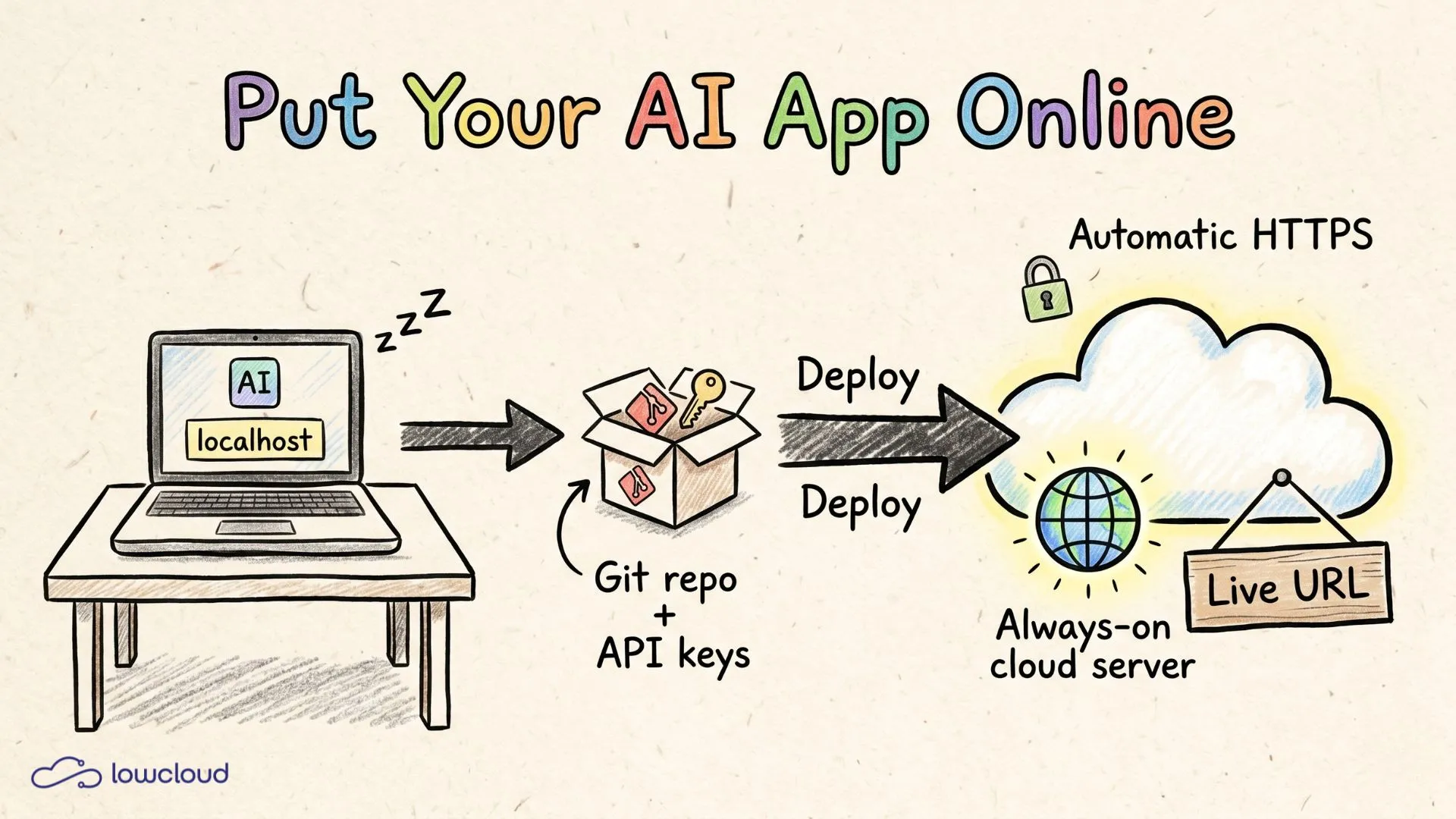
Your app runs. On localhost:3000 it looks finished, the AI responds, the buttons work. The only problem is that nobody but you can see it. Close the laptop and it is gone. You built the thing with Lovable, Cursor or Bolt and you are comfortable prompting, but now words like server, domain and deploy are in the way, and that feels like a completely different league. If you want a plain-language rundown of what these hosting terms mean, start there first.
It is not. Putting an app online just means: place your code on a machine that is always running and give it a public address. That is it. In 2026 you can do this in minutes, without ever touching a server console. This post shows you what going live actually means, which paths exist, and the fastest way from local to a real live URL.
The key points up front
- Putting an app online means your code runs on a permanently reachable server instead of just your laptop, accessible through a public URL.
- You need neither your own server nor Linux skills. Modern deploy platforms handle build, hosting and HTTPS automatically.
- From finished build to live URL it is a few minutes for a typical AI app, as soon as your code sits in a Git repo.
- Most important prep step: move API keys into environment variables, never hardcode them. 45 percent of AI-generated code fails OWASP security checks (Veracode, 2025).
What does "putting an app online" actually mean?
Going online means moving your code from your laptop to a computer that runs around the clock and is reachable from the internet. Your laptop is not that machine: it sleeps, switches Wi-Fi, shuts down. A server does none of that. It gets a public address, and anyone who knows it can see your app.
The words around it mean roughly the same thing. Putting online, deploying, hosting, going live, that is all the same act told from different corners. Developers say deploy because the code is rolled out to its destination. You can say put online, it means the same.
What matters is the difference between a prototype and something reachable. As long as your AI app only runs locally, it is a draft. The public URL is what turns it into something you can share, test and hand to real users. This is exactly the step most people miss when they build something with an AI tool for the first time. 63 percent of vibe coders are not classic developers (Vercel, 2025), and for them deployment is where it suddenly gets technical.
What do you need before your AI app can go online?
Three things, no more: your code in a Git repo, your secret keys moved out, and a clear start command. These three points are where first deploys actually fail, not on some server magic.
Code in a Git repo. Most AI builders can export your code to GitHub with one click. Lovable, for example, pushes your entire project into a GitHub repository at the press of a button, which means you are not locked into their infrastructure. This repo is the source every deploy platform pulls your code from.
API keys as environment variables. If your app calls OpenAI, Anthropic or Supabase, there is a secret key somewhere. It does not belong in the code but in an environment variable, a value the platform hands your app from the outside at runtime. This is not a style tip: researchers found critical database configuration flaws in 170 of 1,645 Lovable apps they studied (Hostinger, 2026). Hardcoded keys are one of the main causes.
A clear start command. The platform needs to know how your app starts and which port it listens on. For many vibe coder projects that is port 3000. When in doubt you can ask your AI tool directly: "Which port does my app run on and which command starts it?"
Which paths exist to bring your app live?
There are roughly three paths, and for your first deploy the choice is clear. You can rent your own server and set everything up yourself, you can use a deploy platform that does the work for you, or you can host a pure frontend statically. The table below puts the three side by side.
| Criterion | Own server (VPS) | Deploy platform (PaaS) | Static host |
|---|---|---|---|
| Prior knowledge | Linux, SSH, reverse proxy | none | minimal |
| Time to live URL | hours | minutes | minutes |
| Backend and AI calls | yes | yes | no, frontend only |
| HTTPS automatic | set up yourself | yes | yes |
| Fits a first deploy | no | yes | pure frontends only |
For an AI app with backend logic, meaning server-side calls to a language model, the deploy platform is the right path. A pure static frontend could manage without it, but the moment an AI call runs server-side, you need real hosting. Save the own server for later, if you ever need it. For the start it is just stress. If you want to dig into what goes wrong, the deployment pitfalls of vibe-coded apps covers the most common mistakes in detail.
How do you actually bring your AI app live?
The fastest path is four steps: connect the repo, enter environment variables, start the deploy, get the live URL. On a platform like lowcloud the rest, meaning build, hosting and the HTTPS certificate, happens automatically in the background.
- Connect the repo. You sign up and connect your GitHub repo. The platform detects which framework your app is built with. No config file, no Dockerfile needed.
- Enter environment variables. You add your API keys and database URLs once in the dashboard. They reach your app securely without ever sitting in the code.
- Start the deploy. One click. The platform builds your app and starts it.
- Get the live URL. You receive a public address back. From now on your app is reachable, even when your laptop is off.
Updates run by themselves after that. Push a change to your repo and the platform rebuilds automatically. You keep working in your AI tool, and the deployment keeps pace without you touching anything. The full road from idea to your own domain is mapped out in the guide on getting your app to a live URL.
Where the first deploy usually gets stuck
It is almost always the same three stumbling blocks, and none of them has anything to do with programming. From the deploys that vibe coders and AI app builders run on lowcloud, we see the same pattern again and again: a forgotten environment variable, a wrongly set port, an unclear start command.
The most common mistake is the forgotten variable. The app builds cleanly, starts, and crashes on the first AI call because the API key is missing. The fix: every key that sat locally in a .env file also goes into the platform dashboard. A related issue: some values need to be present at build time, others only at runtime. When in doubt, ask your AI tool whether a variable is needed at build or runtime.
The second stumbling block is the port. Your app listens on a specific port, often 3000, and the platform has to address the same port. If they do not match, the page loads forever and shows nothing in the end.
And as a side note, because many of our builders do not have this on their radar at first: your app runs on servers in Germany with us. That is not an extra step and costs you nothing in speed, but your data and your users' data sit under GDPR instead of the US CLOUD Act. A nice side effect, no extra work.
Frequently asked questions
Do I need my own server to put my AI app online?
No. For your first deploy an own server is the wrong path. A deploy platform handles hosting, build and HTTPS automatically, and you need no Linux or DevOps skills for it. You set up your own server only when you have very specific requirements, and at the start that is practically never the case.
What does it cost to host a small AI app?
For a small app with little traffic you are looking at a low single-digit to mid double-digit euro range per month on most platforms. Some offer a free allowance to get started. It only gets expensive with heavy traffic or large databases, so not in the phase you are in right now.
Where do my API keys go once the app is online?
Into environment variables, never into the code. You enter them once in the platform dashboard, and your app reads them at runtime. This matters because 45 percent of AI-generated code fails OWASP security checks (Veracode, 2025), and hardcoded keys are a main reason.
What is the difference between putting online and deploying?
None, it is the same. Deploy is just the developer word for rolling out your code to its public destination. When someone talks about deploying, hosting or going live, they mean the same process you know as putting online.
Does my app stay reachable when my laptop is off?
Yes, that is exactly the point. Once your app sits on a server, it runs independently of your machine around the clock. Your laptop can be off, on a plane or in repair, your live URL stays reachable.
Conclusion
Putting an AI app online is not an infrastructure project but a handful of clear steps: code into the repo, keys into the environment variables, click deploy, get the live URL. The whole server part you may have been wary of is handled by the platform. You stay in the world you know, building and prompting, and still get a real public address for your project. Vibe coding is everyday work by now, and by 2028 some 40 percent of new enterprise software is expected to be built this way (Gartner, 2025). The step from local to live is the smallest one on the way.
Bring your project live now: Start for free and deploy your first app.
Vibe Coding Tools: Ship Faster Without the Chaos
Vibe Coding Tools for developers & DevOps: which categories actually help you ship faster – plus selection criteria, best practices and governance for teams.
Best S3-Compatible Object Storage Providers (2026 Comparison)
Compare the best S3-compatible object storage solutions in 2026: MinIO, Cloudflare R2, Impossible Cloud, Hetzner, Backblaze B2, Wasabi, Garage, Ceph and more — with a comparison table and decision guide for GDPR-compliant and Kubernetes environments.