Cloud TCO: Hidden Costs AWS, Azure & GCP Don't Show You

Cloud TCO: What the Cloud Really Costs and What Companies Systematically Underestimate
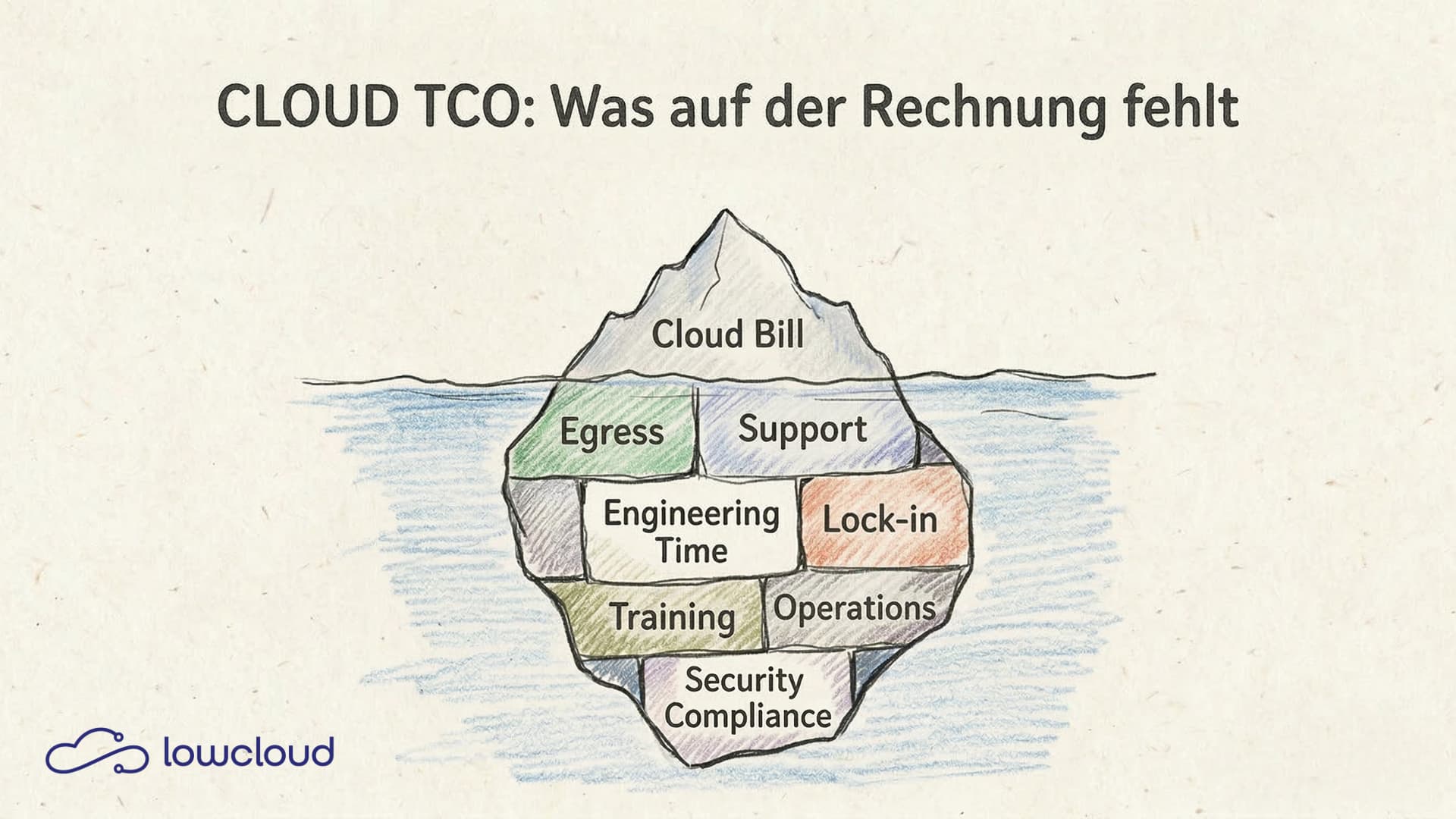
Cloud budgets are regularly exceeded — not because the planning was poor, but because many cost factors are simply missing from the TCO model. The monthly AWS or GCP invoice surprises teams time and again, even though resources were carefully calculated. The problem rarely lies with the compute costs that everyone keeps an eye on. It lies with everything around them.
What TCO Means in the Cloud
Total Cost of Ownership describes the full costs associated with operating an infrastructure over a defined period. In traditional IT, this includes hardware, electricity, cooling, rent, and personnel. In the cloud, the picture shifts. Some cost categories disappear, new ones emerge, and many are significantly harder to capture.
A cloud TCO model must cover three layers:
- Direct infrastructure costs: what appears on the cloud invoice
- Indirect operational costs: engineering hours, tools, processes
- Opportunity costs and lock-in: what it costs to stay with a provider — or to switch
Anyone who only considers layer 1 has an incomplete picture. And an incomplete picture leads to flawed decisions.
The Obvious Costs — and Why They're Only Half the Story
Compute, storage, databases, load balancers. These are the line items everyone enters into their cloud budget. Cloud providers make it easy to estimate these costs with their pricing calculators. The problem: the calculators show what a resource costs, not what operating that resource costs.
A single Kubernetes node on a managed cluster is inexpensive. But what does the cluster cost as a whole — including the control plane, network plugin, logging stack, monitoring, alerting, and the three engineers who configure and maintain it all? This question is asked too rarely. At least not early enough.
Furthermore, cloud costs are variable. Fixed monthly costs are easy to plan for. Variably scaled resources — auto-scaling groups, serverless functions, managed databases with usage-based pricing — can produce surprises during traffic spikes that aren't in the budget.
Hidden Cost Drivers in Cloud TCO
Egress Costs
Data transfer into the cloud is typically free or cheap. Data transfer out of the cloud — to end users, to other cloud regions, or to on-premises systems — is expensive. Depending on the region, AWS charges between $0.08 and $0.09 per GB of outbound traffic. For data-intensive applications, this quickly adds up to four-figure monthly amounts. For a detailed breakdown of egress fee pricing models across AWS, Azure, and GCP, see our dedicated analysis.
If you don't explicitly account for egress costs during architecture design, you're building yourself a silent cost problem. This is especially true for applications with high data volumes, video streaming, backups to other regions, or multi-cloud scenarios where data flows between providers.
Support Tier Costs
A cloud provider's standard support is usually insufficient for production workloads. Business or enterprise support at AWS costs between 10% of the monthly bill (minimum $100) and significantly more, depending on the SLA. With a monthly infrastructure bill of $20,000, that quickly adds $2,000 or more for support alone — a line item missing from many initial calculations.
Third-Party Licenses on Cloud Instances
Managed services often don't fully replace third-party software. If you're running a commercial database or proprietary monitoring tool on an EC2 instance, you pay the license costs on top. Some licenses scale with the number of vCPUs or RAM, which can lead to significantly higher license costs on cloud instances compared to equivalent on-premises hardware.
Idle Resources and Over-Provisioning
Studies from FinOps providers consistently show that 30–40% of cloud resources in production environments are either running idle or significantly over-provisioned. Development environments that aren't shut down at night. Reservations that weren't adjusted after an architecture change. Load balancers for services that no longer exist.
This isn't a criticism of teams. It's a structural problem. Cloud resources are easy to create and rarely actively decommissioned.
Operational Costs: What Engineering Hours Really Cost
This is the line item most frequently missing from cloud TCO: the time of your own employees.
A self-managed Kubernetes cluster on bare metal or in the cloud requires maintenance. Updates, security patches, node issues, network debugging, storage configuration. Someone has to do this. For a senior DevOps engineer with an annual salary of €90,000, two hours per week of cluster maintenance already amounts to roughly €4,500 per year. That sounds manageable. But it's rarely just two hours, and it's rarely just one person.
Add to that: incident response (who answers alerts at night?), onboarding new team members to the infrastructure, documentation, security reviews, and the regular work of addressing technical debt.
Operational costs belong in every TCO model — as their own line item, with a realistic hourly rate and an honest assessment of the effort involved. For strategies on how IT automation reduces these costs, see our dedicated analysis.
Lock-in and Migration Costs as Part of TCO
Cloud providers create incentives to invest deeply in their ecosystem: managed services, proprietary APIs, specific network architectures. This isn't inherently bad — managed services often save real operational costs. But they increase migration costs when a switch becomes necessary — a process the EU Data Act now regulates.
What does it cost to migrate an application built on AWS DynamoDB to another provider? What does it cost to rewrite an architecture based on Azure Functions to GCP Cloud Run? The answer is: more than expected, and usually more than the cost savings that triggered the switch.
Lock-in isn't an argument against cloud offerings. But it belongs transparently in the TCO calculation — as an implicit commitment to a provider over the coming years.
Managed Services vs. Self-Hosted: Which Is Cheaper?
The answer depends on the situation, but the trend surprises many teams.
A managed Kubernetes service (EKS, GKE, AKS) costs between $70 and $150 per month for the control plane, depending on the provider. Self-hosted on your own infrastructure or on bare-metal nodes looks cheaper at first glance. On second look, often not: the operational costs for etcd backups, API server updates, CNI configuration, and node issues quickly add up to more than the saved management fee.
The same applies to databases: a self-managed PostgreSQL on a VM is cheap in infrastructure but expensive to operate. Automated backups, high availability, point-in-time recovery, monitoring — someone has to configure and oversee all of that.
A DevOps-as-a-Service platform like lowcloud takes a different approach: it fully abstracts away Kubernetes complexity, offers managed workloads without cluster management overhead, and makes operational costs predictable. When you compare the actual TCO — including engineering hours — you'll often find that a platform is cheaper than expected. Our managed services ROI analysis provides a concrete cost model showing how managed services can reduce total costs by approximately 60%.
What a Realistic Cloud TCO Model Looks Like
A robust TCO model needs at least these categories:
Infrastructure Costs (Direct)
- Compute (reserved instances, on-demand, spot)
- Storage (block, object, file)
- Network (ingress, egress, inter-region)
- Managed services (databases, queues, CDN, DNS)
- Support tier
Operational Costs (Indirect)
- Engineering hours for operations and maintenance (estimate realistically)
- Monitoring and observability tools
- Security tools and compliance audits
- Incident response capacity
Strategic Costs
- Lock-in assessment: how high would migration costs be?
- Scaling scenarios: what does 3× traffic cost?
- License costs at scale
The FinOps approach helps keep these models current. FinOps doesn't mean cutting cloud costs at any price — it means consciously steering cloud spending, clearly assigning responsibilities, and treating cost transparency as a shared team goal.
Tools like AWS Cost Explorer, Google Cloud Billing, Kubecost (for Kubernetes), or Cloudability help capture cost data. But the real work is organizational: teams need to take ownership of their infrastructure costs.
Cloud costs are manageable — but only when you see them in full. Anyone who takes TCO seriously doesn't just calculate the infrastructure bill but includes operational costs, license fees, egress charges, and lock-in risks. The result isn't a pessimistic view of the cloud — it's a realistic one that enables better decisions.
If you want to know how the TCO of a lowcloud DaaS environment compares to a self-managed Kubernetes cluster, take a look at our platform. We help make actual operational costs transparent — with no hidden line items.