What Is Kubernetes? A Practical Guide to Container Orchestration

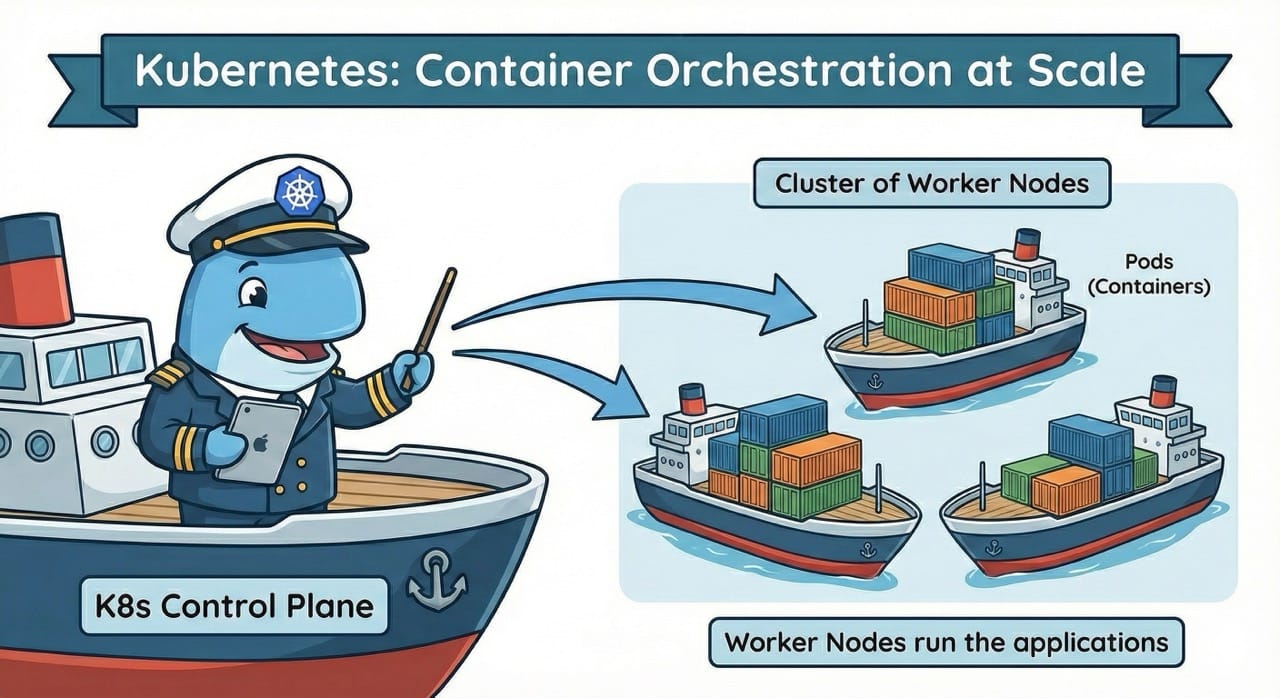
Containers have fundamentally changed how we build and ship software. But once you go from a handful of containers to dozens or hundreds, managing them by hand quickly becomes unsustainable. That's where Kubernetes comes in — a platform that automates the management of containerized applications at scale. So what exactly is Kubernetes, how does it work, and when does it actually make sense to use it?
The Origins of Kubernetes
Kubernetes was originally developed at Google, drawing on more than 15 years of experience running internal systems like Borg and Omega, which orchestrate millions of containers across Google's data centers. It was open-sourced in 2014 and donated to the Cloud Native Computing Foundation (CNCF) in 2015. Today, Kubernetes has become the de facto standard for container orchestration and is actively maintained by a large community of developers, companies, and cloud providers.
The name "Kubernetes" comes from Greek and means "helmsman" or "pilot" — a fitting metaphor for a platform that steers containers through complex infrastructure. The project is commonly abbreviated as K8s (K, followed by eight letters, followed by s).
The Problem Kubernetes Solves
Before container orchestration became widespread, deploying applications was often tedious and error-prone. Docker made containers popular, but Docker alone falls short once applications need to run across multiple servers. Development and DevOps teams then face challenges such as:
- Distributing containers across multiple servers (nodes)
- Load balancing between container instances
- Automatically restarting failed containers
- Scaling under increased load
- Rolling updates with zero downtime
- Service discovery and network configuration
- Storage management for persistent data (e.g., deploying PostgreSQL with Helm charts or self-hosted object storage like SeaweedFS and Garage)
Handling all of this manually is not only time-consuming but also error-prone. Kubernetes automates these processes through a declarative API that lets developers describe the desired state of their application while Kubernetes takes care of the rest.
How Does Kubernetes Work? The Core Architecture
Kubernetes organizes resources into clusters made up of multiple servers, either physical or virtual. A cluster consists of two main components:
Control Plane: The Brain of the Cluster
The Control Plane is the management layer of Kubernetes and makes all scheduling and orchestration decisions for the cluster. It includes several components:
- API Server: The central communication hub through which all requests are routed
- Scheduler: Decides which node a new Pod should be placed on
- Controller Manager: Monitors the cluster state and reconciles it with the desired state
- etcd: A distributed key-value store that holds the entire cluster state
Worker Nodes: Where the Work Happens
Worker Nodes are the servers that actually run your containers. Each node runs the following components:
- Kubelet: An agent that communicates with the Control Plane and manages containers on the node
- Container Runtime: The software that runs containers (e.g., containerd or CRI-O)
- Kube-proxy: Manages network rules and enables communication between Pods
The Desired State Model
At the heart of Kubernetes is the desired state model. Rather than issuing imperative commands ("start three containers on server A"), you describe the state you want ("I want three instances of my application running"). Kubernetes continuously monitors the actual state and automatically reconciles it with the desired state.
For example, if a container crashes, Kubernetes detects the discrepancy and automatically starts a new container to restore the desired state — without any manual intervention.
Key Kubernetes Concepts
To work with Kubernetes effectively, you need to understand a few core concepts:
Pods — The Smallest Unit
A Pod is the smallest deployable unit in Kubernetes. A Pod contains one or more containers that share networking and storage. In most cases, a Pod runs a single container, but there are scenarios (e.g., the sidecar pattern) where multiple containers need to work closely together.
Pods are ephemeral, meaning they can be deleted and recreated at any time. Kubernetes does not guarantee that a Pod will be rescheduled on the same node or retain the same IP address.
Services — Stable Network Endpoints
Since Pods are short-lived, you need a stable way to reach them. Services provide a consistent IP address and DNS name, automatically routing traffic to the appropriate Pods. Services act as load balancers and come in several types:
- ClusterIP: Internal access within the cluster
- NodePort: External access via a port on each node
- LoadBalancer: Integration with cloud load balancers
Deployments — Declarative Management
A Deployment defines how many replicas of an application should run and which container image to use. Deployments enable:
- Declarative updates: Changing the desired state in a YAML file
- Rolling updates: Gradually replacing old Pods with new ones
- Rollbacks: Reverting to a previous version if something goes wrong
What Can Kubernetes Do? Core Features
Kubernetes provides a wide range of features that simplify the management of containerized applications:
Self-Healing and High Availability
Kubernetes continuously monitors the health of all Pods. If a Pod fails, a new one is automatically started. If a Pod stops responding to health checks (liveness and readiness probes), it is either restarted or removed from load balancing. This ensures high availability without manual intervention.
Automatic Scaling
The Horizontal Pod Autoscaler allows Kubernetes to automatically adjust the number of Pod replicas based on CPU usage, memory consumption, or custom metrics. As load increases, new Pods are added; as it decreases, they are removed.
The Vertical Pod Autoscaler adjusts the resource requests of individual Pods, while the Cluster Autoscaler adds new nodes to the cluster when needed.
Rolling Updates and Rollbacks
Deployments support rolling updates, where new versions are gradually rolled out while old versions continue to serve traffic. If issues arise, changes can be reverted with a single command:
kubectl rollout undo deployment/my-app
This strategy minimizes downtime and reduces the risk of faulty deployments.
kubectl and YAML: Kubernetes in Practice
Interaction with Kubernetes primarily happens through kubectl, the command-line tool for Kubernetes. It lets developers create, inspect, modify, and delete resources:
# List Pods
kubectl get pods

# View Pod logs
kubectl logs my-pod

# Port-forward for local debugging
kubectl port-forward my-pod 8080:80
Kubernetes resources are typically defined in YAML files that describe the desired state — though as complexity grows, tools like Helm, Kustomize, and CRDs can simplify Kubernetes configuration significantly. Here's a simple example of a Deployment:
apiVersion: apps/v1
kind: Deployment
metadata:
  name: my-app
spec:
  replicas: 3
  selector:
    matchLabels:
      app: my-app
  template:
    metadata:
      labels:
        app: my-app
    spec:
      containers:
        - name: my-app
          image: my-app:1.0
          ports:
            - containerPort: 8080
Running kubectl apply -f deployment.yaml applies this configuration to the cluster.
When Is Kubernetes Worth It?
Despite its benefits, Kubernetes isn't the right choice for every project. The platform comes with significant complexity and requires both a learning investment and operational expertise.
Kubernetes is a good fit when:
- You need to orchestrate multiple container-based services
- High availability and automatic scaling are important
- You're pursuing a multi-cloud or hybrid cloud strategy
- Your team already has container experience
- You need a standardized platform for diverse workloads
Kubernetes is overkill when:
- You're running a single, simple application
- Your team lacks the resources to build Kubernetes expertise
- Docker Compose or simpler orchestration tools are sufficient
- You prefer a serverless architecture
An honest assessment of your requirements and resources is essential. Not every project needs the full feature set of Kubernetes.
Kubernetes Distributions and Managed Services
Kubernetes is an open-source project, but there are numerous distributions and managed services that simplify getting started and day-to-day operations:
For local development:
- Minikube: Lightweight Kubernetes for developers
- kind (Kubernetes in Docker): Fast local clusters
- K3s: Lightweight distribution for edge, IoT, and resource-constrained clusters
Managed Kubernetes in the cloud:
- Google Kubernetes Engine (GKE)
- Amazon Elastic Kubernetes Service (EKS)
- Azure Kubernetes Service (AKS)
- DigitalOcean Kubernetes
Enterprise distributions:
- Red Hat OpenShift
- Rancher
- VMware Tanzu
Managed services handle Control Plane management and significantly reduce operational overhead, allowing teams to focus on their applications rather than maintaining clusters.
Getting Started with Your First Kubernetes Cluster
Getting into Kubernetes doesn't have to be overwhelming. A pragmatic approach might look like this:
Step 1: Experiment locally
Install Minikube or kind and try out simple Deployments. Get familiar with Pods, Services, and Deployments in a safe local environment.
Step 2: Work through tutorials
The official Kubernetes documentation offers excellent tutorials. Work through them and build simple applications to reinforce your understanding.
Step 3: Use a managed service
For production workloads, a managed Kubernetes service is recommended. The setup complexity is much lower, letting you focus on deploying your applications.
Step 4: Set up monitoring and logging
Implement monitoring with Prometheus and Grafana and centralized logging (e.g., Loki stack or EFK with Fluent Bit) from the start. Observability is critical in distributed systems — and especially so when running AI agent workloads on Kubernetes, where the Reason-Act loop and tool calls add new tracing requirements.
Step 5: Adopt GitOps and CI/CD
Automate deployments with GitOps tools like ArgoCD or Flux, and integrate Kubernetes into your CI/CD pipeline.
Kubernetes as a Foundation for PaaS Platforms
Kubernetes is capable but complex. Many organizations want the benefits of container orchestration without having to deal with the operational overhead of running Kubernetes themselves. This is exactly where modern Platform-as-a-Service (PaaS) solutions come in.
These platforms build on top of Kubernetes and provide an abstraction layer that gives developers a Heroku-like deployment experience — push your code with git push and it's live in production — while leveraging Kubernetes' reliability and scalability under the hood. Teams get self-service access to resources without needing to write YAML files or understand cluster internals.
Kubernetes-based PaaS solutions combine the best of both worlds:
- The standardization and portability of Kubernetes
- The developer experience of a streamlined deployment platform
- Sovereignty through operation on your own infrastructure
- Cost efficiency through multi-tenancy and optimized resource utilization
For teams that want Kubernetes benefits without Kubernetes complexity, a PaaS platform is often the most pragmatic path. For teams that want to skip YAML entirely, zero-config Kubernetes platforms offer sensible defaults out of the box. You get automatic scaling, self-healing, and declarative management — without needing to build a dedicated Kubernetes operations team.
Conclusion
Kubernetes has shaped how modern cloud-native applications are operated and has become an industry standard. The platform offers a comprehensive set of features for orchestration, scaling, and self-healing. At the same time, its complexity should not be underestimated — Kubernetes is a sophisticated tool that requires careful planning and expertise.
For teams running complex, distributed applications with the resources to support it, Kubernetes is an excellent choice. Our step-by-step Kubernetes migration guide provides a structured approach for teams ready to make the transition. For smaller projects or teams without dedicated DevOps capacity, simpler alternatives or abstracted PaaS platforms may be the better option.
The question isn't "Do I need Kubernetes?" but rather "Do I need the benefits of container orchestration, and if so, at what level of abstraction?" The answer determines whether you work with Kubernetes directly or use a platform that pairs Kubernetes capabilities with developer-friendly workflows.
What Is Kustomize? Managing Kubernetes Configs Cleanly
Kustomize manages Kubernetes configurations through bases and overlays — no templates. YAML stays readable, valid, and flexibly adaptable across environments.
The Best Heroku Alternatives in 2026
Heroku is in maintenance mode. We compare Render, Railway, Fly.io, Porter and lowcloud as serious alternatives for teams planning a migration.