What Is DevOps as a Service and When Does It Actually Make Sense?

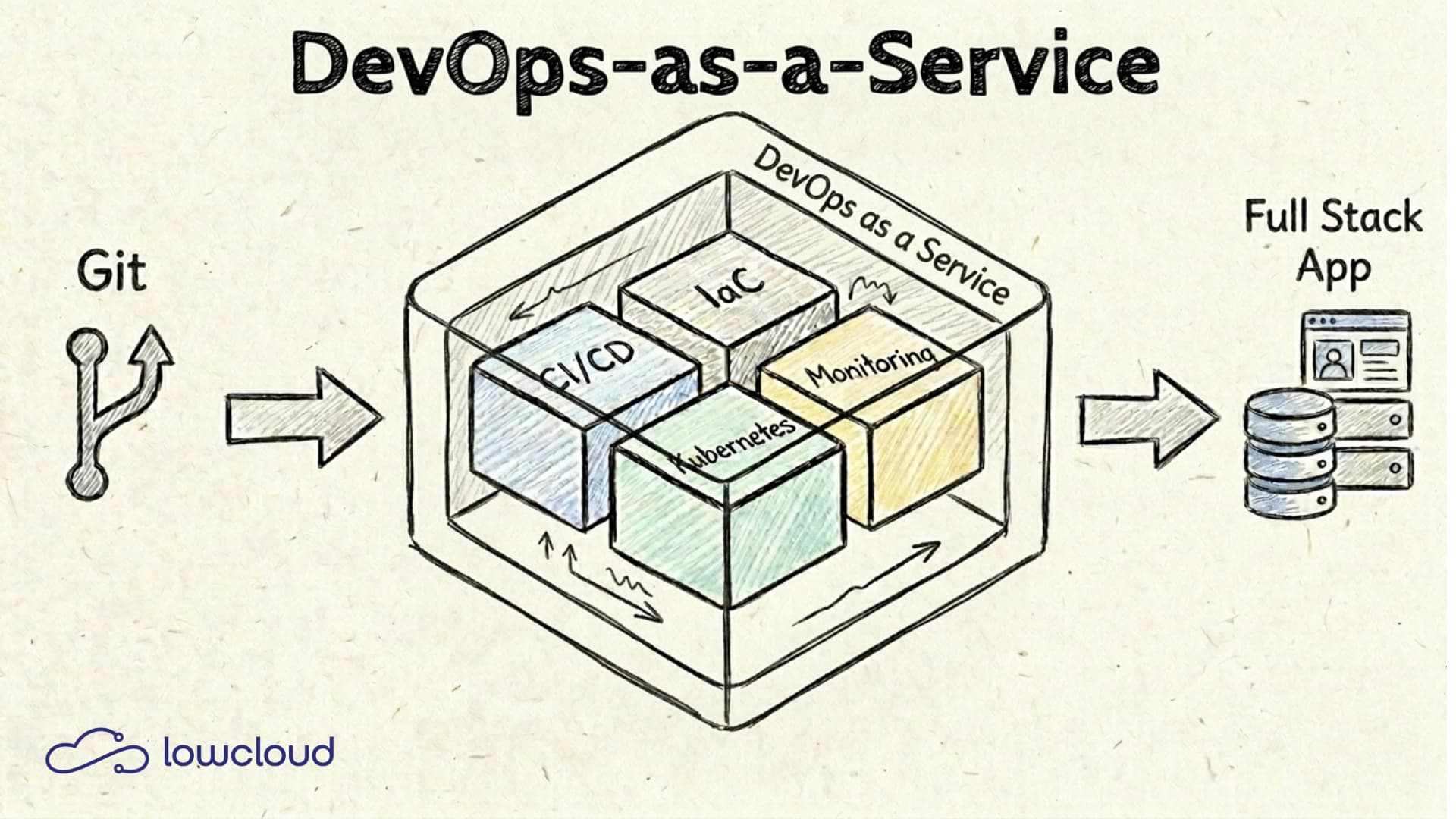
DevOps as a Service sounds like yet another buzzword. But behind it lies a concrete model that can take real work off development teams, when applied correctly. This article explains what DaaS means, what a provider actually delivers, and where the limits of the model lie.
What DevOps as a Service Means
DevOps as a Service (DaaS for short) is a service model in which companies outsource their DevOps processes, tools, and infrastructure to an external provider. The provider takes over the setup and operation of CI/CD pipelines, infrastructure automation, container orchestration, and monitoring. Everything that would otherwise require a dedicated internal team.
This is not a new idea, but the term has gained clarity in recent years. The reason: the complexity of modern software delivery has increased significantly. Managing Kubernetes clusters, setting up GitOps workflows, running observability stacks — all of this requires time and expertise that many teams simply don't have.
DevOps as a Service is not a replacement for DevOps culture, but a way to create the technical prerequisites for it faster and with less internal effort. For how collaborative DevOps teams build shared ownership in practice, see our guide. For organizations that have outgrown basic DevOps, Platform Engineering takes these foundations further by building an Internal Developer Platform.
How It Differs from Classic DevOps
Classic DevOps is a way of working: development and operations collaborate, processes are automated, feedback loops get shorter. It's a matter of team organization and company culture. Not a product you can buy.
DaaS picks up exactly there: the external provider delivers the tools, platforms, and automations needed for modern DevOps processes. The internal team doesn't have to build and maintain them themselves.
How It Differs from PaaS
Platform as a Service (PaaS) provides a runtime environment. The provider takes care of servers, operating systems, and often middleware as well. The developer deploys their application, and the provider handles the rest.
DaaS goes a step further. It covers not just the platform, but also the processes around it: pipeline design, deployment strategies, incident management, infrastructure automation. When a PaaS provider integrates these workflows, it approaches a DaaS model. A detailed comparison of DaaS vs. PaaS can be found in our article PaaS vs. DaaS.
What a DaaS Provider Actually Delivers
The offering varies by provider, but most cover four core technical areas.
CI/CD Pipelines
Continuous Integration and Continuous Delivery are the heart of modern software delivery. CI/CD pipelines automatically build the code, run tests, and deploy to the target environment — without manual intervention.
A DaaS provider sets up and operates these pipelines. This typically includes:
- Integration with the existing Git repository (GitHub, GitLab, Bitbucket)
- Automatic build and test stages
- Deployment to staging and production based on defined rules
- Rollback mechanisms for failed deployments
Tools like GitLab CI, GitHub Actions, or Tekton are commonly used. The provider handles configuration, maintenance, and updates, while the team defines what gets deployed and when.
Infrastructure Automation
Manual server configuration is a relic. With Infrastructure as Code (IaC), the entire infrastructure is described as code, versioned, and provisioned automatically.
DaaS providers use tools like Terraform for cloud infrastructure and Ansible or Helm for configuration. This means:
- New environments can be set up in minutes instead of days
- Infrastructure changes are traceable and reversible
- No "snowflake" problem. Every environment is reproducibly identical
For teams that have been managing infrastructure manually or with unversioned scripts, this is a noticeable quality improvement.
Containers and Kubernetes
Containers are today's standard for packaging applications. They run the same everywhere: on the developer's laptop, in staging, in production. Kubernetes orchestrates these containers: it manages deployments, automatically scales pods up and down, and ensures high availability.
However, running Kubernetes is not a self-runner. Cluster upgrades, network configuration, secrets management, RBAC — operating a production-ready cluster demands constant attention.
A DaaS provider takes over exactly that: it operates the Kubernetes cluster, keeps it up to date, and gives the development team a clean interface to deploy applications. The team deploys, the provider ensures the platform runs.
Monitoring and Observability
Anyone running applications needs to know what's happening inside them. Monitoring captures metrics like CPU usage, response times, and error rates. Observability goes further: logs, traces, and metrics together provide a complete picture of why a system behaves the way it does.
DaaS providers typically set up a complete observability stack:
- Prometheus for metrics
- Grafana for dashboards and visualization
- Loki or Elasticsearch for log aggregation
- Alerting rules that notify the team of anomalies
For a deeper look at how these components work together, see our guide on Kubernetes monitoring with logs and metrics. The advantage: the team doesn't have to build, configure, and maintain this stack themselves. They get dashboards and alerts that work right away.
Who DevOps as a Service Is Right For
DaaS is not a model for everyone. It pays off especially when one or more of the following apply:
No dedicated ops team available. When developers also handle infrastructure on the side, both suffer — a pattern we explore in detail in our article on missing DevOps roles in SMBs. DaaS gives the development team the tools without anyone needing to become a full-time ops engineer.
Rapid growth. Startups and scale-ups often need to quickly set up new environments, deploy new services, and scale infrastructure alongside. An external provider can deliver this faster than an internal team could be built.
Focus on the product, not infrastructure. For many teams, infrastructure is not a core differentiator. They want to build great software, not debug Kubernetes clusters. DaaS enables exactly that.
Limited budget for specialized staff. Senior DevOps engineers are expensive and scarce. A DaaS provider bundles this know-how and makes it accessible to teams that couldn't or wouldn't afford it internally.
What DevOps as a Service Costs: Build vs. Buy
The honest answer to the question "What does DaaS cost?" is: it depends. But the meaningful comparison is not price alone, but build vs. buy.
Building your own DevOps team means: recruiting (3–6 months if it goes well), onboarding, tooling decisions, license costs, ongoing maintenance, and internal knowledge silos. It often takes months before the first production system runs stably.
Buying DaaS means: the provider has already built it. The team can become productive in weeks, not months. In return, you pay a monthly fee — and give up some control.
The break-even depends on team size, requirements, and internal capacity. For many teams under 20 people, DaaS pays off quickly -- our managed services ROI analysis shows concrete numbers. For larger organizations with the necessary know-how, the calculation looks different.
One factor that's often underestimated: the opportunity cost. The time a senior developer invests in infrastructure is missing from the product. That's rarely directly measurable, but real — our cloud TCO analysis breaks down exactly how these hidden costs add up.
A detailed comparison of build vs. buy can be found in our article DevOps vs. DevOps as a Service.
What to Look for When Choosing a Provider
Not all DaaS providers are the same. A few points deserve special attention:
Data sovereignty and GDPR. Where does your data reside? On which servers, in which data center, in which country? For many companies in the DACH region, this is not an abstract compliance question but a concrete requirement. Providers that build on AWS, Azure, or GCP in the US automatically raise questions about data transfers to third countries.
Vendor lock-in. How proprietary are the tools and abstractions used? A provider that uses standard Kubernetes manifests and open tools is easier to switch away from than one that uses a proprietary deployment system. This is not a disqualifier, but something to decide consciously.
SLAs and support. What happens when something doesn't work? How quickly does the provider respond? SLAs are paper — what often matters more is how the provider handles incidents in practice.
Transparency about the tools used. A good DaaS provider explains which tools it uses and why. Black-box solutions where the team has no insight create dependencies that become painful in a crisis.
How lowcloud Implements DevOps as a Service
lowcloud is a DaaS platform operated on sovereign infrastructure in Germany. This means: data resides on servers that fall under German and European law. No data transfers to the US, no dependency on US hyperscalers.
Technically, lowcloud runs on standard Kubernetes with integrated CI/CD workflows, automated infrastructure provisioning, and a pre-installed monitoring stack. Development teams can deploy their applications directly from their Git repository without worrying about cluster operations.
That is the core promise of DevOps as a Service, implemented on a platform that also takes compliance requirements seriously. For teams that need both — fast DevOps workflows and GDPR-compliant infrastructure — this is a combination that's otherwise hard to build yourself.
If you want to see what this could look like for your team, you'll find an easy entry point at lowcloud.io — no lengthy onboarding process required. For a detailed comparison of lowcloud vs. external DaaS providers, including cost models and compliance criteria, see our dedicated analysis.
DevOps as a Service is no silver bullet, but for many teams it's the most pragmatic way to establish modern software delivery processes without building a dedicated ops team. The key question is not whether, but which provider fits your own requirements — both technically and from a regulatory perspective.
Digital Sovereignty with Kubernetes: When Is Open Source Truly Sovereign?
Kubernetes was created by Google. Yet European companies and government agencies use it as the foundation for their sovereign cloud strategy. This is not a contradiction, if you understand which dimension of sovereignty really matters.
Cloud Sovereignty Governance: Why This Topic Belongs in the Boardroom, Not the Server Room
If you are still delegating cloud sovereignty to your IT lead in 2026, you have not understood the regulatory risk. NIS2, DORA, and growing geopolitical uncertainties make a demonstrable sovereign cloud policy mandatory. The responsibility lies not in the server room, but in the boardroom.