Docker vs Kubernetes: Compose, Swarm, and K8s Compared

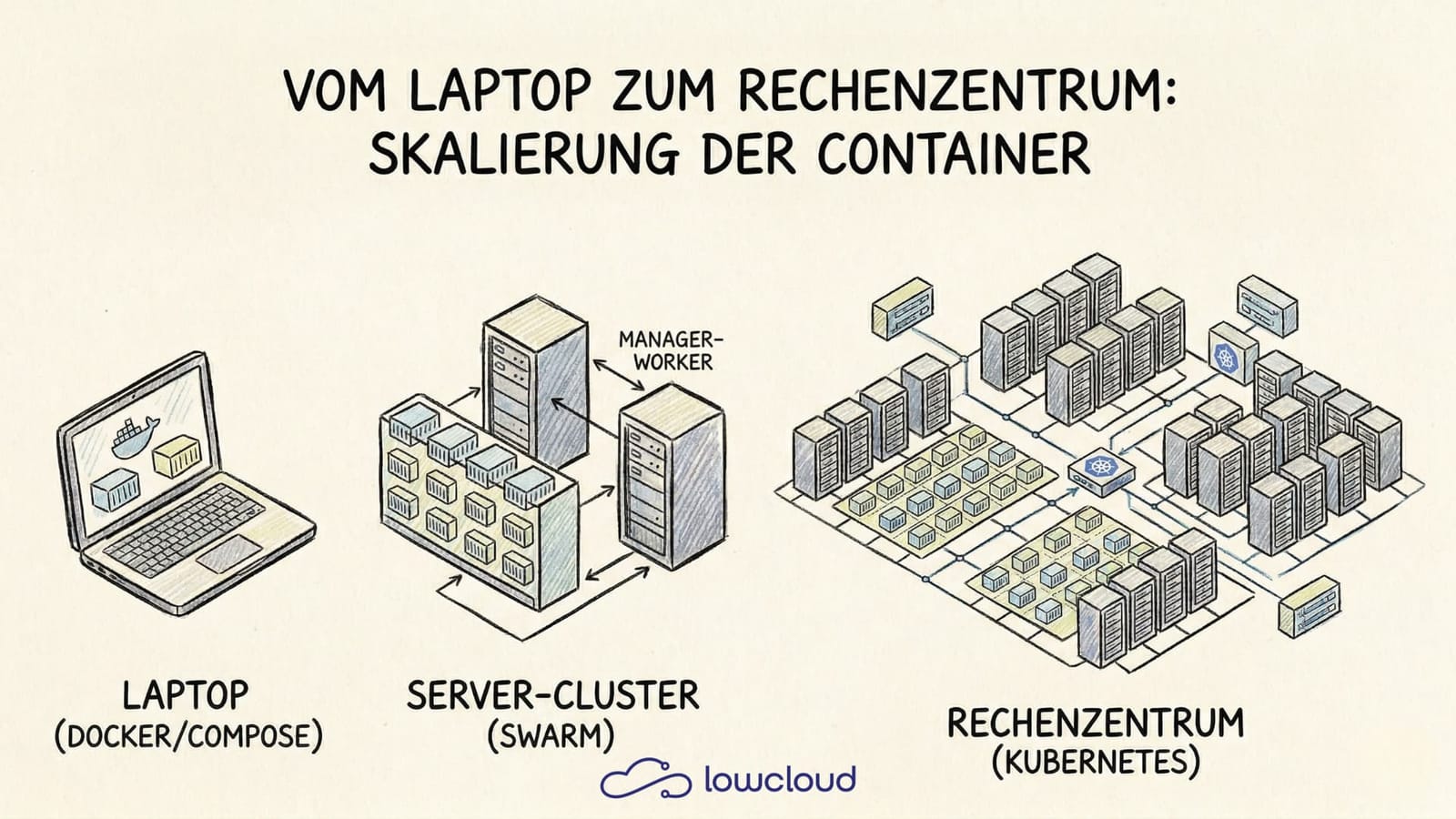
Most people who start out with Docker begin with a simple docker run. Sooner or later more containers pile up, then maybe a Compose file appears, and the moment the team starts talking about production, someone says Kubernetes. At that point, confusion often sets in: what does what, and which tool is actually built for which job?
This article puts Docker, Docker Compose, Docker Swarm, and Kubernetes side by side. Not to crown a winner, but to make the decision easier: which tool fits which problem?
What Docker actually is – and what it isn't
Docker is a containerization platform. It makes sure applications run in isolated, reproducible environments – whether on a developer's laptop or a server in a data center. A Docker image contains the application code, all dependencies, and the runtime environment. Once an image is started, it becomes a container.
What Docker is not out of the box: an orchestration system. Docker itself does not care about distributing containers across multiple hosts, restarting them after failures, or balancing traffic between them. For that, you need either Docker Swarm or Kubernetes, depending on your requirements.
docker run – the direct path to a container
docker run is the simplest way to start a container. Anyone who wants to test an image locally gets there immediately:
docker run -d -p 8080:80 --name my-nginx nginx:latest
This starts nginx in the background, maps port 8080 on the host to port 80 inside the container, and gives the container a name.
Key flags at a glance
| Flag | Meaning |
|---|---|
-d | Run container in the background (detached) |
-p host:container | Port mapping |
-v host:container | Mount a volume |
--env or -e | Set an environment variable |
--rm | Automatically remove container after it stops |
--name | Give the container a name |
--network | Attach container to a network |
docker run is great for single containers, quick tests, and local experiments. As soon as multiple containers need to work together, it gets unwieldy – that's where Compose comes in.
Docker Compose – when one container isn't enough
Docker Compose solves the problem of defining and starting multiple containers as a coherent system. Instead of a long series of docker run commands with flags, there's a single YAML file:
A typical Compose file
services:
  app:
    image: my-app:latest
    ports:
      - "3000:3000"
    environment:
      DATABASE_URL: postgres://user:pass@db:5432/mydb
    depends_on:
      - db

  db:
    image: postgres:15
    volumes:
      - pgdata:/var/lib/postgresql/data
    environment:
      POSTGRES_PASSWORD: pass

volumes:
  pgdata:
With docker compose up -d, the entire stack starts. Compose handles the startup order (thanks to depends_on), the shared network between containers, and volume management.
Where Compose shines: local development, CI/CD pipelines, small deployments on a single server. The tool is quick to learn, the configuration is clear, and a single file describes the complete environment.
Where Compose hits its limits: Compose is designed for a single host. No automatic failover across servers, no built-in load balancing between hosts, no automatic scaling. For anything that goes beyond one machine, you need something else.
Docker Swarm – clustering without Kubernetes complexity
Docker Swarm is Docker's native clustering feature. A single docker swarm init turns a machine into a manager node, and additional nodes can join using a token. After that, you can define services – containers distributed across the cluster:
docker service create --replicas 3 -p 80:80 --name web nginx:latest
Swarm makes sure three replicas are running at any time. If a node fails, the affected containers are restarted on other nodes. Rolling updates are built in as well.
What makes Swarm special: if you know Compose, you practically know Swarm. Compose files can be deployed as Swarm stacks with minimal adjustments. That makes the entry barrier very low.
The catch: the Swarm ecosystem has shrunk significantly in recent years. Many tools, integrations, and cloud providers have concentrated on Kubernetes. Swarm is technically solid, but anyone thinking about production needs to weigh whether it will hold up long term.
Docker vs Kubernetes – the real comparison
Kubernetes has become the standard answer to container orchestration in production. That's true – but it's not a tool you introduce casually on the side.
The central difference to Swarm: Kubernetes is not a Docker feature, but a standalone system with its own API, its own CLI (kubectl), and a much richer conceptual model. Instead of services, there are Pods, Deployments, ReplicaSets, StatefulSets, DaemonSets. Instead of simple port mappings, there are Services of type ClusterIP, NodePort, or LoadBalancer, plus Ingress resources for HTTP routing.
That sounds like overhead at first – and it is, if all you want is to run a stack with three containers. But Kubernetes pays off as soon as the following applies:
- The infrastructure spans multiple nodes
- Automatic scaling is required (Horizontal Pod Autoscaler)
- Complex network and access management (RBAC, NetworkPolicies)
- CI/CD pipelines are expected to interact directly with the infrastructure
- Monitoring, logging, and observability need to be deeply integrated
When is Swarm enough, when do you need Kubernetes?
| Criterion | Docker Compose | Docker Swarm | Kubernetes |
|---|---|---|---|
| Number of hosts | 1 | 2–10 | any |
| Learning curve | low | medium | high |
| Production readiness | limited | good for simple cases | very good |
| Ecosystem | large (local) | shrinking | very large |
| Automatic scaling | no | manual | yes (HPA) |
| Managed offerings | no | rare | available everywhere |
For a small team running a handful of services with no appetite for Kubernetes complexity, Swarm is a valid choice. For anything heading toward scaling, multi-team operations, or cloud-native architecture, Kubernetes is the more realistic path.
Migrating from Compose to Kubernetes
If a project started with Compose and eventually needs to migrate to Kubernetes, Kompose is an official tool that converts Compose files into Kubernetes manifests:
kompose convert -f docker-compose.yml
The result is Deployment and Service manifests that can serve as a starting point. They're rarely production-ready straight away – resource limits, liveness probes, ConfigMaps, and Secrets need to be added manually. But as an entry point, Kompose saves significant time.
Typical pitfalls during migration:
depends_ondoesn't exist in Kubernetes; readiness probes take over that role- Volumes need to be defined as PersistentVolumeClaims
- Environment variables should be moved into ConfigMaps or Secrets, not placed directly in the Deployment manifest
- Inter-service network communication uses Kubernetes service names, not container names
Managed Kubernetes as an alternative to self-hosting
Running Kubernetes yourself is its own discipline. Spinning up a control plane, securing the etcd cluster, handling upgrades, debugging node issues – that ties up capacity many teams would rather put into actual product development.
Managed Kubernetes – Kubernetes clusters operated by a provider – solves this problem in part. GKE, EKS, and AKS take the control plane off your hands. The real question then becomes: how much Kubernetes knowledge and operational work do you still want to own?
If you want to abstract operations even further, DevOps-as-a-Service (DaaS) platforms are an option. They use Kubernetes as a foundation but offer a simplified interface and a managed operational layer. lowcloud, for example, is a Kubernetes-based DaaS platform built specifically for teams that want the benefits of Kubernetes without having to worry about the infrastructure layer. Deployments, scaling, and networking run through the platform, so the team can focus on the code.
Decision guide: which tool when?
In short:
- docker run – for local tests, single containers, quick experiments
- Docker Compose – for local development and simple single-host deployments
- Docker Swarm – for small clusters with a low complexity budget
- Kubernetes – for production environments with scaling requirements, multi-team operations, and cloud-native architecture
No tool is right for every case. The question isn't "which is best?", but "what do I need today – and what will I need in six months?". Starting with Compose doesn't rule out Kubernetes. But if you know from day one that scaling and high availability will matter, you can save yourself the detour.
What Is a Helm Chart? The Package Manager for Kubernetes
Helm charts bundle Kubernetes resources into a versioned package. How they are structured, how templating works, and when to use them.
What Is Kustomize? Managing Kubernetes Configs Cleanly
Kustomize manages Kubernetes configurations through bases and overlays — no templates. YAML stays readable, valid, and flexibly adaptable across environments.