
How It Works
Last updated: March 23, 2026
lowcloud is a DevOps platform that makes Kubernetes accessible to teams without requiring Kubernetes expertise. Infrastructure, deployments, and monitoring are managed through a unified interface.
The Big Picture
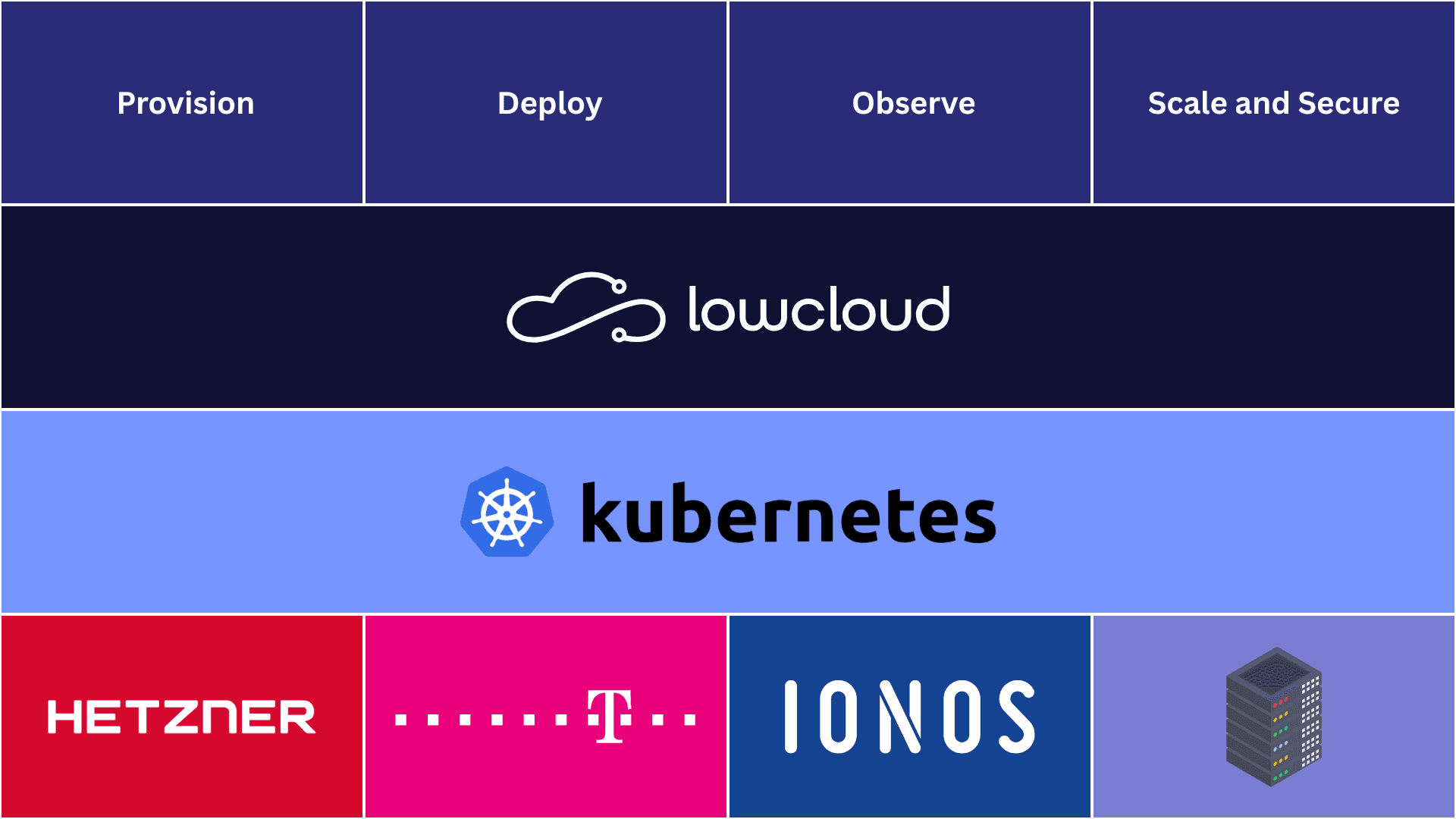
lowcloud acts as a central control plane between you and your cloud infrastructure. Instead of dealing with kubectl, Helm CLI, CI/CD pipelines, and monitoring stacks, you manage everything through the lowcloud Dashboard:
- Infrastructure — Provision and scale Kubernetes clusters automatically
- Deployments — Deploy, update, and manage applications and services
- Monitoring — Monitor clusters and applications, receive alerts on issues
Your infrastructure runs on your cloud account. lowcloud manages it, and you keep full control.
Why Kubernetes?
Kubernetes is the industry standard for container orchestration. It provides:
- Self-healing — Failed containers are automatically restarted
- Scaling — Horizontal and vertical, manual or automatic
- Rolling updates — Zero-downtime deployments out of the box
- Service discovery — Services automatically find each other in the cluster
The problem: Kubernetes is complex. The learning curve is steep, and the operational overhead for cluster management, networking, storage, and security is significant. This is exactly where lowcloud comes in. You get all the benefits of Kubernetes without having to manage the complexity yourself.
Your Infrastructure, Your Control
lowcloud is not shared hosting. Your clusters run on your cloud account at your cloud provider. This means:
- No vendor lock-in — Your infrastructure belongs to you. You can continue without lowcloud at any time.
- Full transparency — You see exactly which resources are running and what they cost.
- Data sovereignty — Your data stays on your infrastructure, in the region of your choice.
lowcloud connects to your cloud provider via API credentials and manages the infrastructure on your behalf.
The Workflow
1. Connect Your Cloud Provider
Add your cloud API credentials to lowcloud. lowcloud uses them to provision resources in your account.
2. Provision a Cluster
lowcloud creates Kubernetes clusters fully automatically using ClusterAPI. This includes the control plane, worker nodes, networking, and load balancers. The entire infrastructure is managed declaratively and can be scaled at any time.
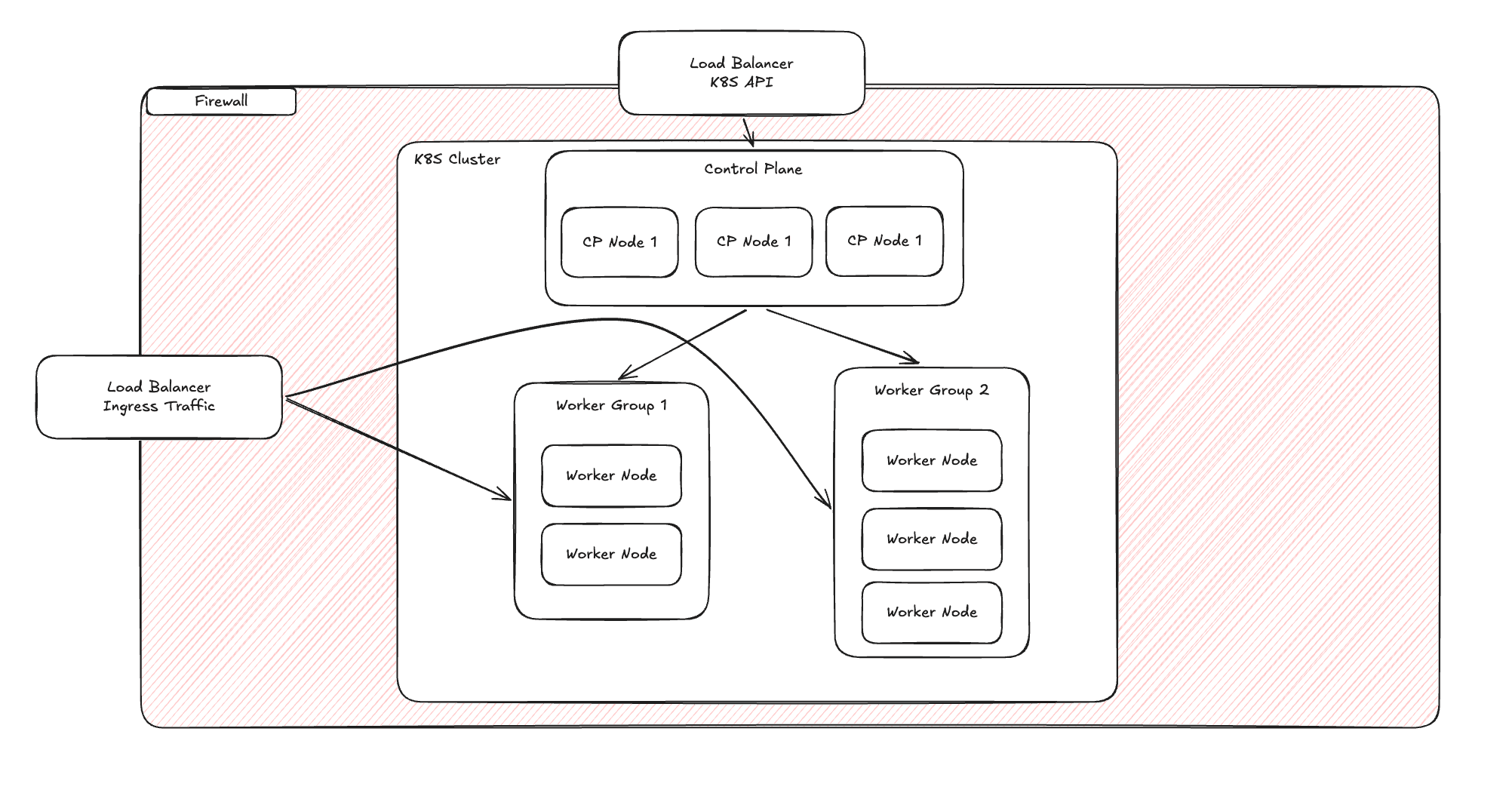
When you provision a cluster, lowcloud creates the following resources in your cloud account:
- Firewall — Secures the entire cluster by restricting network access to only necessary ports and protocols.
- Load Balancer (K8S API) — Distributes requests to the Kubernetes API across control plane nodes for high availability.
- Load Balancer (Ingress Traffic) — Routes external HTTP/HTTPS traffic to your applications running inside the cluster.
- Control Plane Nodes — Three nodes running the Kubernetes control plane for redundancy and high availability.
- Worker Groups — Groups of worker nodes where your applications and services run. You can configure multiple worker groups with different machine types to match your workload requirements.
Inside Your Cluster
Once provisioned, lowcloud sets up everything inside the cluster that your applications need to run.
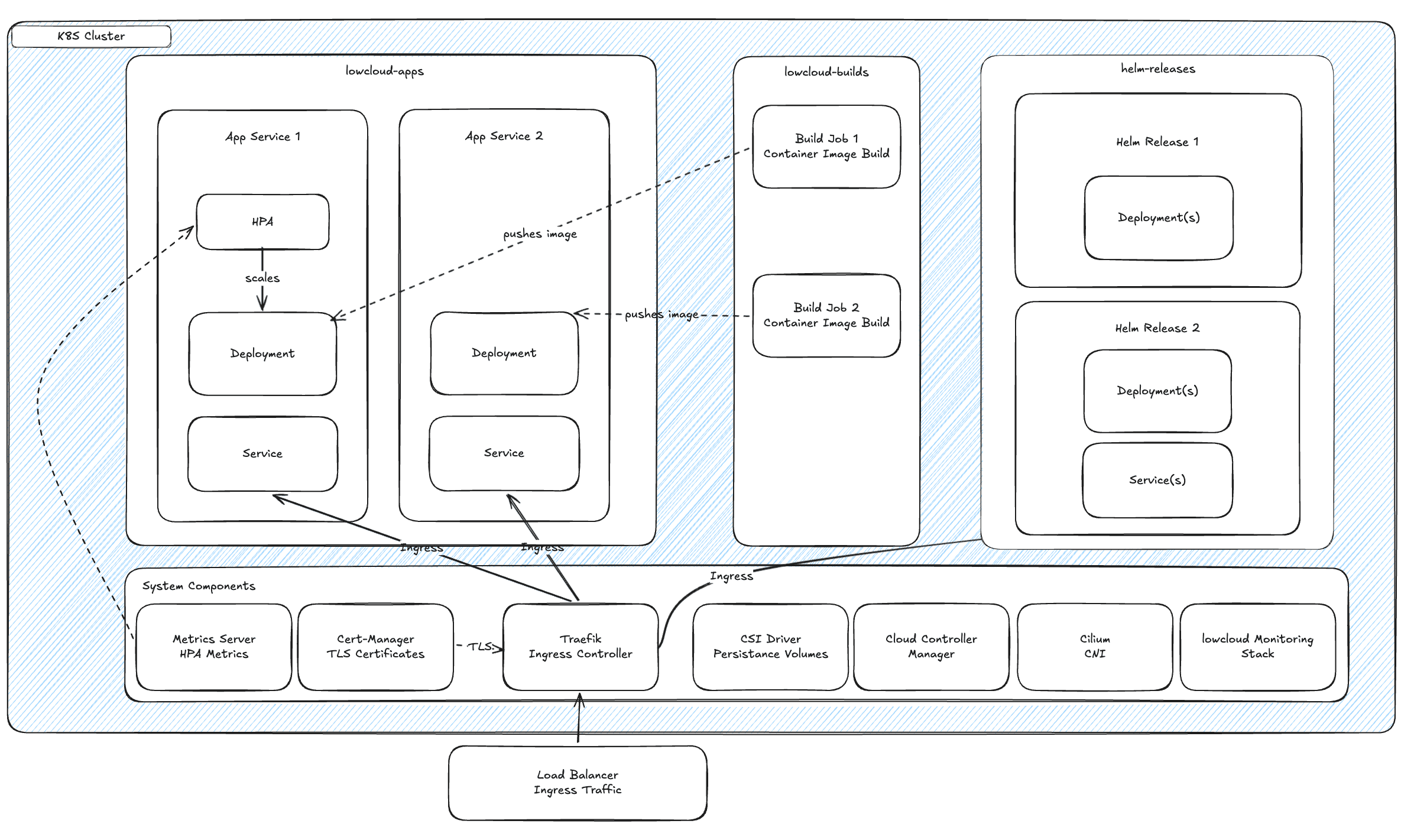
Your cluster is organized into dedicated namespaces:
- lowcloud-apps — Your application services. Each app is built from a connected GitHub repository, deployed as a Kubernetes Deployment, and exposed through a Service.
- lowcloud-builds — Container image build jobs. When you push code, lowcloud creates build jobs here that produce container images for your apps.
- helm-<releasename> — Each Helm Release runs in its own namespace (e.g.
helm-postgresql,helm-redis). Each release manages its own Deployments and Services.
lowcloud also installs and manages essential system components automatically:
- Traefik — Ingress controller that routes external traffic to your services
- Cert-Manager — Automatic TLS certificate provisioning and renewal
- Cilium — Container networking (CNI) for pod-to-pod communication
- CSI Driver — Persistent volume provisioning for stateful workloads
- Cloud Controller Manager — Integration with cloud provider APIs for load balancers and nodes
- Metrics Server — Collects resource metrics for autoscaling (HPA)
- lowcloud Monitoring Stack — Built-in monitoring and alerting
3. Deploy Applications
Deploy your applications through one of two paths:
- Container Apps — Connect a GitHub repository. lowcloud detects code changes, builds container images, and deploys them automatically to your cluster.
- Helm Releases — Deploy pre-configured services like PostgreSQL, Redis, or n8n directly from Helm Chart registries.
4. Monitor and Scale
lowcloud continuously monitors your clusters and applications. You are automatically notified when issues arise, such as high resource utilization or failed deployments. Clusters and applications can be scaled up or down at any time.
What You Can Deploy
| Type | Description | Examples |
|---|---|---|
| Container Apps | Your own applications from GitHub repositories | Web apps, APIs, workers, cron jobs |
| Helm Releases | Pre-configured services from Chart registries | PostgreSQL, Redis, n8n, Grafana |
Container Apps
Connect your GitHub repository and a container registry. lowcloud automatically builds your app as a container image on every push, pushes it to the registry, and deploys it to your cluster.
Helm Releases
For databases, caches, and other infrastructure services, you use Helm Releases. Specify a chart registry, configure the values, and deploy. The entire management runs through the Dashboard. With Helm Release Dependencies, you link services together so lowcloud automatically handles startup order and service discovery.
Monitoring & Alerting
Monitoring and alerting are integrated out of the box and require no additional configuration. lowcloud monitors:
- Cluster health — Node status, resource utilization, Kubernetes events
- Applications — Pod status, restarts, deployment progress
- Notifications — Automatic alerts when issues arise